
VoIP requirements come down to four layers working together: enough bandwidth for every simultaneous call, a network stable enough to keep latency, jitter, and packet loss inside strict limits, the right hardware from the switch to the desk phone, and the setup work (Quality of Service, security, and redundancy) that ties it all together. Get all four right and cloud calling sounds better than the old copper line it replaced. Miss one and the platform gets blamed for problems the network actually caused. This guide walks through every requirement with the real numbers and the standards behind them, so you can tell whether your business is ready before you port a single number.
- Bandwidth: budget about 100 kbps each way per G.711 call (87.2 kbps of actual usage plus headroom), or about 31 kbps for compressed G.729. Size to peak concurrent calls, not headcount.
- Internet speed: the FCC lists under 0.5 Mbps as the floor for a single call, but real businesses need symmetric bandwidth scaled to concurrent calls plus 20 to 30 percent headroom.
- Latency: keep one-way delay at or under 150 ms (ITU-T G.114). Past 400 ms, calls become unusable.
- Jitter and loss: jitter under 30 ms and packet loss under 1 percent, or audio turns choppy and robotic.
- Quality of Service is non-negotiable: mark voice as Expedited Forwarding (DSCP 46) so it beats data traffic during congestion.
- Hardware: business-grade router or firewall, a managed PoE switch, SIP phones or softphones, and (for larger sites) a Session Border Controller.
- Redundancy: a secondary internet connection with automatic failover keeps calls alive when the primary link drops.
- Security: encrypt signaling with TLS and media with SRTP, isolate voice on a VLAN, and monitor for toll fraud, as NIST recommends.
- Test before you cut over: a pre-deployment network assessment finds the weak link while it is still cheap to fix.
What’s in This Guide
- What “VoIP Requirements” Actually Means
- VoIP Bandwidth Requirements
- VoIP Latency, Jitter, and Packet Loss Requirements
- VoIP Hardware Requirements
- VoIP System and Software Requirements
- Network Configuration and QoS Setup Requirements
- Internet Connection and Redundancy Requirements
- VoIP Security Requirements
- Pre-Deployment Testing and Readiness Assessment
- Implementation Roadmap: What to Do Next
- Related Resources
- Every VoIP Requirement at a Glance
- Frequently Asked Questions
- Methodology and Sources
What “VoIP Requirements” Actually Means
Voice over IP turns a phone call into data packets and sends them across the same internet connection that carries your email and file shares. That is its great advantage and its central challenge. A phone call is unforgiving in a way that a web page is not: if a web page loads a half-second late, nobody notices, but if voice packets arrive a half-second late, the conversation falls apart. So “VoIP requirements” is really a set of conditions your network has to meet consistently, call after call, for every user at once.
It helps to think about those conditions in four layers. The first is capacity: do you have enough bandwidth for the number of calls that happen at the same time, in both directions? The second is quality: is the connection stable enough to keep delay, jitter, and packet loss inside the thresholds that voice demands? The third is hardware: are the router, switch, phones, and supporting devices capable and correctly specified? The fourth is configuration: is the network set up to prioritize, secure, and back up voice traffic? A business can pass three layers and still have bad calls because the fourth was ignored.
This layered view matters because VoIP failures are almost always misdiagnosed. When calls sound bad, the instinct is to blame the provider or the phones. In practice, the modern hosted platforms are mature and reliable, and the fault usually sits somewhere in your own four layers, most often an oversubscribed upload link or missing Quality of Service. That is good news: requirements you control are requirements you can fix. If you want the business-first version of this readiness picture rather than the technical deep dive, our companion piece on the ten organizational requirements for a business phone system frames the same territory around people and process instead of packets.
One clarification worth making early, because it shapes several requirements below: VoIP is the underlying transport, while the broader UCaaS platform that layers messaging, video, and presence on top of calling adds requirements of its own (more bandwidth for video, more concern for security). This guide focuses on the voice requirements first, since voice is the most demanding real-time workload and everything else builds on the same foundation.
The one-sentence version: VoIP works when your network can deliver small voice packets on time, every time, with priority over other traffic, on hardware built for the job, over a connection that does not run out of room at your busiest hour.
Source: FCC on VoIP | ITU-T Recommendation G.114
VoIP Bandwidth Requirements
Bandwidth is where most VoIP planning begins, and where most of it goes wrong. The number people quote (roughly 100 kbps per call) is close enough for a rule of thumb, but the real figure depends on which codec compresses the audio and how much protocol overhead rides along with each packet. Understanding the actual math keeps you from buying too little bandwidth or wildly over-provisioning.
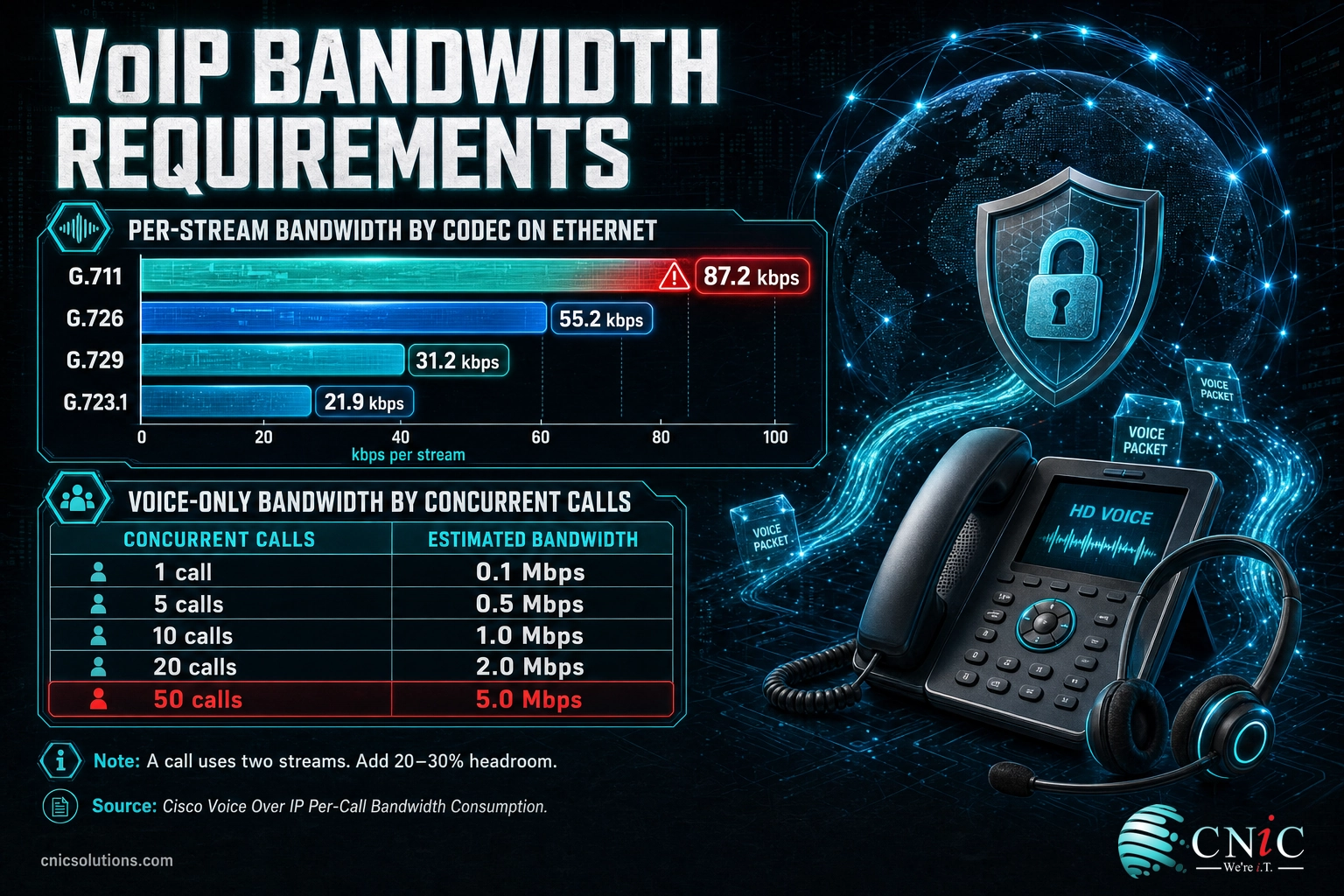
A codec is the algorithm that turns your voice into digital data. The two you will meet most often are G.711 and G.729. G.711 is uncompressed and produces clean, full-clarity audio, but the raw codec stream is 64 kbps. Once each 20-millisecond voice sample is wrapped in RTP, UDP, IP, and Ethernet headers, Cisco’s per-call bandwidth analysis puts the real figure at 87.2 kbps for a single one-way stream. Because a call has two streams (you talking and them talking), a full G.711 conversation consumes about 174.4 kbps of total bandwidth. G.729 compresses the codec stream to 8 kbps and lands at 31.2 kbps per stream after the same overhead, trading a little audio fidelity for roughly a third of the bandwidth.
That protocol overhead is the part planners forget. The headers roughly double a compressed codec’s footprint, which is why “8 kbps codec” becomes “31 kbps on the wire.” The chart below shows the real per-stream consumption across the common codecs, all measured on Ethernet with the standard 20-millisecond packet size.
Per-Stream Bandwidth by Codec (one direction, Ethernet, 20 ms packets)
Source: Cisco, Voice Over IP Per-Call Bandwidth Consumption. Figures are per one-way stream; a call uses two streams.
The second thing that trips businesses up is upload. Residential and many business internet plans are asymmetric, advertising a big download number and a much smaller upload number. Voice is symmetric and continuous: your phones send just as much data as they receive. So the constraint on how many calls you can run is almost always your upload capacity, not the headline download speed. When a sales floor of twenty phones sounds fine in the morning and terrible at 2 p.m., an overwhelmed upload link during the busy period is the classic cause.
To size a connection, multiply your peak number of simultaneous calls by the per-call figure for your codec, then add 20 to 30 percent headroom for signaling, retransmissions, and growth. Crucially, plan around concurrent calls, not total phones. A 40-person office rarely has 40 people on the phone at once; sizing for realistic peak concurrency (often a quarter to a third of headcount) keeps you from paying for a circuit you never fully use. The table below shows voice-only bandwidth for common concurrency levels.
| Concurrent calls | G.711 each way (~100 kbps/call) | G.729 each way (~31 kbps/call) | Notes |
|---|---|---|---|
| 1 | 0.1 Mbps | 0.03 Mbps | A single line; the FCC lists under 0.5 Mbps as the floor. |
| 5 | 0.5 Mbps | 0.16 Mbps | Small office; still trivial for a business circuit. |
| 10 | 1.0 Mbps | 0.31 Mbps | Add headroom and data; a 10+ Mbps symmetric link is comfortable. |
| 20 | 2.0 Mbps | 0.62 Mbps | Busy team; upload capacity becomes the deciding factor. |
| 50 | 5.0 Mbps | 1.6 Mbps | Call center scale; QoS and a dedicated circuit strongly advised. |
Figures are voice only and per direction; real deployments must add the bandwidth used by everything else on the network. This is exactly the analysis a network assessment produces, and getting it wrong on either side (too little bandwidth or an expensive circuit you never fill) is avoidable with a proper measurement.
Source: Cisco: Voice Over IP Per-Call Bandwidth Consumption | FCC Broadband Speed Guide
VoIP Latency, Jitter, and Packet Loss Requirements
Bandwidth answers “how much,” but three quality metrics answer “how well.” You can have gigabit fiber and still suffer terrible calls if these three drift out of range. They are latency, jitter, and packet loss, and together they decide whether a conversation feels natural or maddening.
Latency is the one-way time a voice packet takes to travel from your mouth to the other person’s ear. The authoritative benchmark is ITU-T Recommendation G.114, which sets 150 milliseconds as the threshold below which “most applications, both speech and non-speech, will experience essentially transparent interactivity.” Between 150 and 400 ms, conversation is still possible but degraded: people start talking over each other because the natural pause feels wrong. Above 400 ms, the delay is unacceptable and the call feels like a satellite link from decades past.
Jitter is the variation in packet arrival times. Voice packets are sent on a steady rhythm, but networks deliver them unevenly, and if the gaps between arrivals swing too much, the receiving phone’s buffer cannot smooth them out and the audio breaks into a choppy, stuttering mess. Cisco’s Quality of Service guidance for voice targets jitter under 30 ms. A small jitter buffer on the phone hides minor variation, but it does so by adding delay, so jitter and latency are linked: fighting one can worsen the other.
Packet loss is exactly what it sounds like, packets that never arrive. Voice has no time to retransmit a lost packet the way a file download does, so a lost packet is just a missing slice of sound. Small amounts are masked by the codec, but Cisco recommends keeping loss under 1 percent; beyond that, words drop out and calls sound clipped or robotic. The chart below sets out the target range for each metric.
VoIP Network Quality Thresholds (target ceilings)
Sources: ITU-T G.114 (latency); Cisco QoS for Voice over IP (jitter, packet loss). Bar widths are illustrative of the ceiling, not to a shared scale.
The myth that “more bandwidth fixes bad calls.” Businesses routinely upgrade their internet to solve choppy audio and are baffled when nothing improves. Bandwidth is only the capacity layer; latency, jitter, and packet loss are quality problems that a bigger pipe does not touch. Choppy calls on a fast connection point to congestion timing, wireless interference, or missing Quality of Service, not to a shortage of megabits. Measure the three quality metrics before you spend a dollar on more bandwidth.
The practical takeaway is that all three metrics must be measured, not assumed. Every reputable platform and MSP can run a network readiness test that reports your real latency, jitter, and loss under load. If any one is out of range, that is your problem to solve before go-live, and it usually traces back to the configuration layer covered further down. For a deeper look at how these metrics show up as day-to-day symptoms, see our breakdown of the most common VoIP call-quality problems and how to fix them.
Source: ITU-T Recommendation G.114 | Cisco: Quality of Service for Voice over IP
VoIP Hardware Requirements
With capacity and quality understood, the next layer is the physical equipment that carries and terminates the calls. VoIP hardware requirements are modest compared to old on-premises PBX systems, but each device has a job, and skimping on any one of them shows up as a support ticket later.
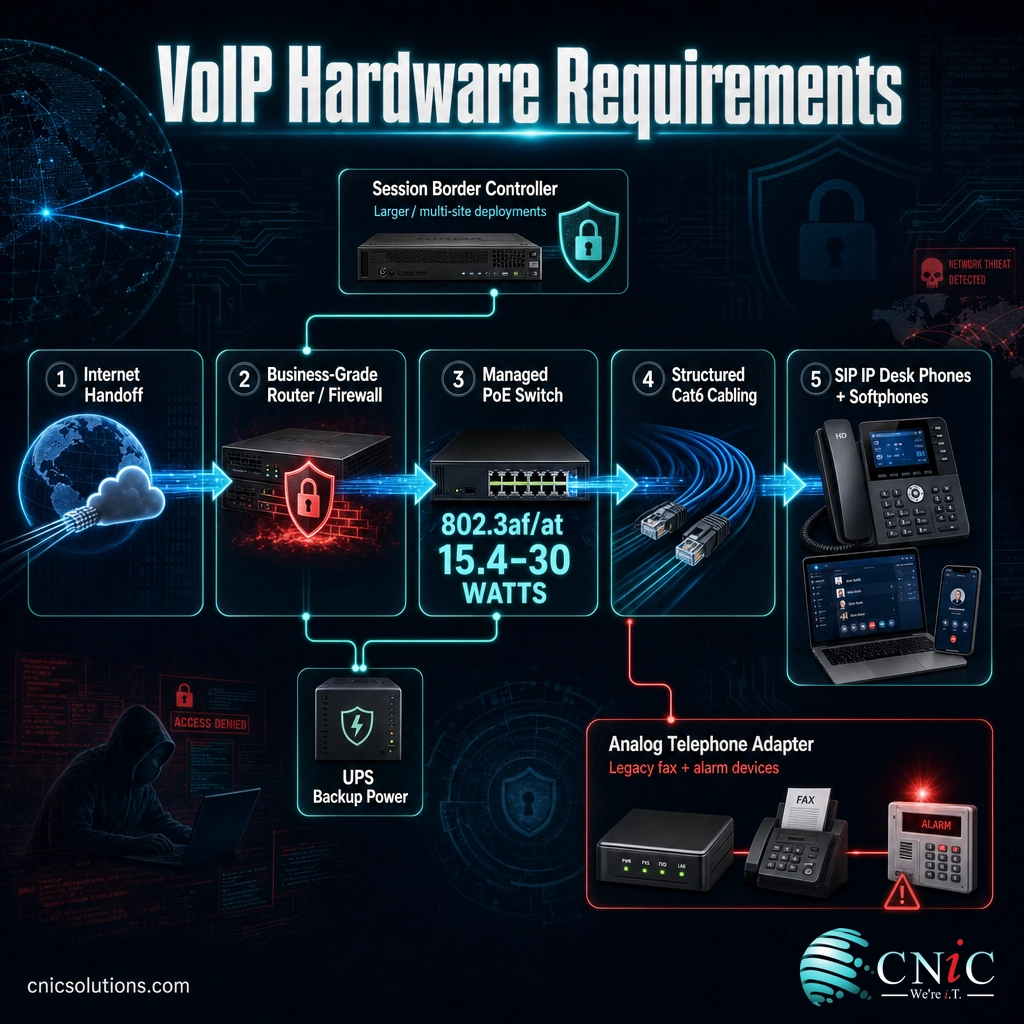
Start at the edge. A business-grade router or firewall handles the connection to your provider and, critically, manages NAT and the SIP protocol without mangling call setup. Consumer routers are a frequent source of one-way audio and dropped registrations because their SIP handling is unpredictable. A proper firewall also gives you the controls to prioritize and protect voice traffic, which the security and QoS sections below depend on.
Next comes the switch. A managed switch lets you separate voice onto its own VLAN and apply Quality of Service, and a switch with Power over Ethernet powers the phones over the same cable that carries their data. The IEEE 802.3af standard delivers about 15.4 watts per port and 802.3at (PoE+) about 30 watts, comfortably enough for desk phones with room to spare. PoE removes a rat’s nest of power bricks and, more importantly, lets you keep every phone alive on a single UPS. Our explainer on how Power over Ethernet powers devices over the network cable covers the standards in depth.
The phones themselves are SIP-compliant IP handsets, or softphones (an app on a computer or smartphone), or a mix. Physical desk phones want a wired connection for stability; softphones give mobility at the cost of Wi-Fi’s variability. Two supporting devices round out most deployments: an analog telephone adapter (ATA) to connect legacy equipment like fax machines, alarm panels, or door phones, and, for larger or multi-site organizations, a Session Border Controller (SBC) that sits at the edge to secure signaling, translate between protocols, and control call flows.
Underneath all of it sits cabling. Category 5e is the practical minimum, and Category 6 gives you gigabit headroom and cleaner PoE delivery for a small cost difference during a build-out. Because the phones ride your structured cabling, poor or aging cable runs undercut everything above them; if you are wiring or rewiring an office, doing it to a modern standard is the cheapest insurance you will buy. Our comparison of Category 6 versus 6a cabling for office networks helps size that decision.
Ask About Structured Cabling for Voice
Source: Cisco: Quality of Service for Voice over IP | IEEE 802.3 Ethernet standards
VoIP System and Software Requirements
Beyond the boxes on the wall, a working VoIP deployment has a handful of system and software requirements that keep phones registered, provisioned, and reachable. These are easy to overlook precisely because they are invisible when they work.
Every phone needs an IP address, DNS, and accurate time. In practice that means a healthy DHCP scope with enough addresses for the phones (a voice VLAN should have its own scope), reliable DNS resolution so handsets can find the platform, and NTP time synchronization so call logs and certificates line up. Certificate validation for encrypted signaling quietly fails when a device’s clock is wrong, which produces mysterious registration errors that have nothing to do with voice quality.
Provisioning is how phones receive their configuration. Cloud platforms typically auto-provision handsets by MAC address so a phone can be shipped to a remote worker, plugged in, and configured automatically. That convenience depends on outbound access to the provider’s provisioning servers, so firewall rules and any content filtering have to allow it. For softphones, confirm the operating system and app requirements: current Windows or macOS for desktop clients, a supported iOS or Android version for mobile, a decent headset or microphone, and enough spare CPU and memory that the softphone is not fighting other applications for resources.
Power is a system requirement, not an afterthought. Traditional desk phones drew power from the phone line and kept working in an outage. IP phones do not. If phones must survive a power blip, put the router, switch, and any on-premises gear on an uninterruptible power supply (UPS), and remember that internet access itself needs backup power to stay up. This is one of the most common gaps between a VoIP system that looks complete and one that actually is.
Finally, plan for emergency calling (E911). Because an IP phone can physically move, the platform needs an accurate registered address for each device or location so that a 911 call routes to the correct dispatch center and reports the right address. This is both a safety requirement and, in the United States, a regulatory one. Confirm how your provider handles E911 for on-site and remote users before go-live, not after.
Source: FCC: 911 and E911 Services | Cisco: Quality of Service for Voice over IP
Network Configuration and QoS Setup Requirements
This is the layer that separates a VoIP deployment that sounds great under load from one that falls apart the moment the network gets busy. Bandwidth and hardware are necessary, but configuration is what guarantees voice actually gets the treatment it needs when it competes with backups, video calls, and file transfers.
Quality of Service (QoS) is the single most important setting. QoS tags voice packets with a priority marking so switches and routers move them to the front of the queue whenever a link is congested. The standard marking for voice is Expedited Forwarding, carried in the DSCP field as value 46 and defined by the IETF in RFC 3246. With QoS in place, a saturated internet connection slows your file uploads instead of your phone calls; without it, everything shares the same lane and voice loses the moment traffic spikes. QoS has to be applied consistently, on the phones, the switches, and the router, because one device that ignores the marking becomes the weak link.
A dedicated voice VLAN is the companion to QoS. Placing phones on their own virtual LAN separates voice from data traffic, simplifies applying QoS, contains broadcast noise, and improves security by isolating the phones from general workstation traffic. Managed switches make this straightforward, and it is a standard part of any professional VoIP build. If VLANs are new territory, our primer on using VLANs to segment traffic on a business network explains the concept and the payoff.
Firewall and SIP handling complete the picture. The firewall must permit the SIP signaling and RTP media ports your provider uses, and (a frequent gotcha) the SIP ALG feature built into many routers should usually be disabled, because its well-meaning attempts to rewrite SIP messages often break registration and cause one-way audio. Wired connections should be the default for desk phones; if Wi-Fi calling is required, extend QoS to the wireless with WMM, provide adequate access-point density, and put voice on its own SSID mapped to the voice VLAN. All of this is standard network configuration work, and it is where partnering with a team that does it daily pays off.
Explore Our Telecommunications Services
Source: IETF RFC 3246: An Expedited Forwarding PHB | Cisco: Quality of Service for Voice over IP
Internet Connection and Redundancy Requirements
Your voice quality can never be better than the internet connection it rides on, so the circuit itself is a requirement worth specifying carefully rather than inheriting whatever plan happens to be in the building.
The ideal VoIP circuit is business-grade and, wherever possible, symmetric, meaning upload and download speeds match. Because voice sends as much as it receives, the small upload numbers on typical asymmetric plans are the hidden ceiling on how many calls you can run. A business fiber connection with equal upload and download removes that constraint and generally comes with a service-level agreement, which residential-style plans lack. Consistency matters more than peak speed here: a rock-steady 50 Mbps beats a bursty 500 Mbps for voice every time. If you are evaluating circuits, our guide to choosing the right business internet connection covers what to look for beyond the advertised number.
Redundancy is the requirement most businesses skip and most regret. When your phones live in the cloud, a dead internet connection means a dead phone system, and outages happen to everyone eventually. A secondary connection on a different medium (fiber primary with a cable or fixed-wireless backup, for example) plus a firewall that fails over automatically keeps calls alive when the primary link drops. Many cloud platforms add a second safety net: if the site goes completely dark, inbound calls can automatically forward to mobile phones or another location, so customers still reach a person. Pairing a resilient connection with automatic call rerouting turns an outage from a crisis into a non-event, which is the same continuity thinking behind good business continuity and recovery planning.
For distributed workforces, the connection requirement extends to every remote location and home office, each of which needs adequate, stable bandwidth of its own. That is a different planning problem than a single headquarters, and we cover it in our guide to phone systems built for remote and hybrid teams.
Source: FCC Broadband Speed Guide | FCC: VoIP and Cyber Security
VoIP Security Requirements
Because VoIP runs over the internet, it inherits internet risks: eavesdropping, denial-of-service attacks, and toll fraud where an attacker hijacks your system to place expensive calls. Security is therefore a genuine requirement, not an optional extra, and the good news is that the necessary controls are well established. The definitive reference is NIST Special Publication 800-58, “Security Considerations for Voice Over IP Systems.”
The two foundational controls are encryption of signaling and media. Transport Layer Security (TLS) encrypts the SIP call-setup messages so an attacker cannot read or tamper with who is calling whom, and Secure RTP (SRTP) encrypts the audio itself so a conversation intercepted on the wire is unintelligible. Reputable cloud platforms support both; the requirement is to confirm they are turned on rather than assuming the defaults are secure.
Around the encryption sit several network and account controls. Segment voice onto its own VLAN (the same separation that helps QoS also limits an attacker’s reach), protect the edge with a firewall or Session Border Controller that understands SIP and can rate-limit or block abusive traffic, and use strong, unique SIP credentials rather than the vendor defaults that automated scanners hunt for constantly. Finally, monitor for toll fraud: unusual call volume, calls to unexpected international destinations, or spikes at odd hours are the fingerprints of a compromised extension, and a spend cap or geographic call restriction limits the damage if one slips through.
Default settings are an open door. The most common VoIP security failures are not sophisticated attacks; they are systems left on factory passwords with management ports exposed to the internet. Automated bots scan for exactly this around the clock. Change every default credential, close unnecessary ports, and put voice behind a firewall or SBC before the system ever takes a live call.
Voice security is one thread of an organization’s overall security posture, and it is strongest when it is designed in alongside the rest of your defenses rather than bolted on afterward. Our overview of securing a cloud communications platform end to end connects these voice controls to the broader picture.
Source: NIST SP 800-58: Security Considerations for Voice Over IP Systems | CISA: Cyber Threats and Advisories
Pre-Deployment Testing and Readiness Assessment
Every requirement above can be verified before you commit, and doing so is the difference between a smooth cutover and a week of firefighting. A readiness assessment measures your network against the thresholds in this guide and surfaces the weak link while it is still cheap to fix.
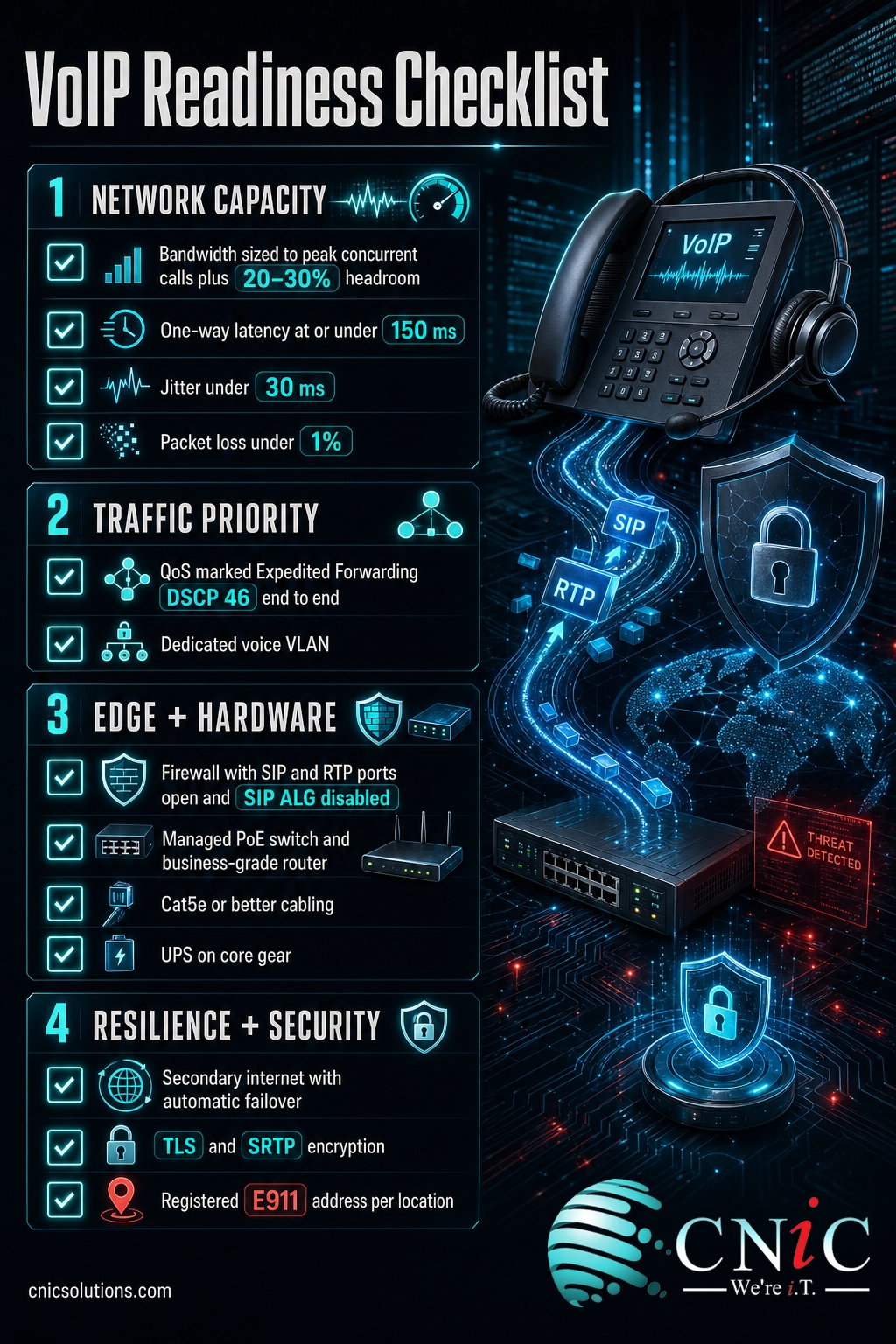
A proper assessment runs a network readiness test under realistic load, not on an idle network at midnight. It measures actual latency, jitter, and packet loss to the provider, confirms upload and download capacity against your peak concurrent-call estimate, and checks that QoS markings survive the trip through every switch and router. It also inventories the hardware (is the firewall SIP-friendly, is the switch managed and PoE-capable, is the cabling up to standard) and reviews security settings and E911 configuration. The checklist below captures the requirements to verify before go-live.
- Bandwidth: upload and download sized to peak concurrent calls plus 20 to 30 percent headroom.
- Latency: one-way delay measured at or under 150 ms.
- Jitter: under 30 ms across a sustained test.
- Packet loss: under 1 percent under load.
- QoS: voice marked Expedited Forwarding (DSCP 46) and honored on phones, switches, and router.
- Voice VLAN: phones isolated on their own VLAN with a dedicated DHCP scope.
- Firewall: SIP and RTP ports open, SIP ALG disabled, edge protected.
- Hardware: business-grade router or firewall, managed PoE switch, SIP phones, ATA and SBC as needed.
- Cabling: Category 5e or better, verified and tested.
- Power: router, switch, and gear on a UPS.
- Redundancy: secondary internet connection with automatic failover.
- Security: TLS signaling, SRTP media, strong credentials, toll-fraud monitoring.
- E911: accurate registered address for every location and device.
If any item fails, that is your pre-launch punch list. Most fixes (enabling QoS, disabling SIP ALG, adding a UPS, upgrading an upload circuit) are quick and inexpensive relative to the cost of a phone system that frustrates staff and customers on day one. When you are ready to move from planning to execution, our step-by-step VoIP migration checklist takes it from a validated network to a live cutover.
Source: Cisco: Quality of Service for Voice over IP | ITU-T Recommendation G.114
Implementation Roadmap: What to Do Next
Requirements are only useful when they turn into action. The roadmap below sequences the work in the order that de-risks a deployment, from measuring what you have to securing what you build.
| Action | Priority | Timeline | Relevant service |
|---|---|---|---|
| Run a network readiness test for latency, jitter, loss, and bandwidth | Critical | Week 1 | Network assessment |
| Size upload and download to peak concurrent calls plus headroom | Critical | Week 1 | Telecommunications |
| Configure QoS (DSCP 46) end to end and a dedicated voice VLAN | Critical | Week 1–2 | Networking services |
| Confirm or upgrade router, managed PoE switch, and cabling | High | Week 2 | Cabling and networking |
| Disable SIP ALG and open the required SIP and RTP ports | High | Week 2 | Networking services |
| Add a secondary internet connection with automatic failover | High | Week 2–3 | Telecommunications |
| Enable TLS and SRTP, set strong credentials, harden the edge | High | Week 2–3 | Cybersecurity |
| Register accurate E911 addresses for every location and device | Critical | Before go-live | UCaaS platform setup |
| Provision phones, pilot with a small group, then cut over | Medium | Week 3–4 | Managed IT |
| Monitor quality and toll-fraud alerts after launch | Medium | Ongoing | Managed IT |
The pattern is deliberate: measure first, fix the network, then add hardware, redundancy, and security, and only then move users. Skipping the measurement step is the most common and most expensive mistake, because it means discovering a network problem after the phones are already live. A managed IT partner can run this sequence end to end so voice is right the first time.
Source: Cisco: Quality of Service for Voice over IP | NIST SP 800-58
Related Resources
This pillar is the hub for a cluster of deeper dives. Use these to go further on any single requirement or to move from planning to a live system.
- The ten business requirements for a VoIP phone system (the organizational, people-and-process view of readiness)
- The most common VoIP call-quality problems and their fixes
- A step-by-step VoIP migration checklist
- How UCaaS differs from basic VoIP
- Securing a cloud communications platform
- WebRTC and browser-based calling explained
- Using VLANs to segment voice traffic
- Power over Ethernet for desk phones
- UCaaS and cloud phone pricing
Authoritative external references worth bookmarking: the ITU-T G.114 latency recommendation, Cisco’s per-call bandwidth analysis, the FCC Broadband Speed Guide, IETF RFC 3246 on Expedited Forwarding, and NIST SP 800-58 on VoIP security.
Every VoIP Requirement at a Glance
The full requirement set in one place, with the recommended specification, why it matters, and the source behind each threshold.
| Requirement | Recommended spec | Why it matters | Source |
|---|---|---|---|
| Download speed, single call | ≥ 0.5 Mbps | Floor for one conversation | FCC |
| Bandwidth per G.711 call | ~100 kbps each way | Voice is bidirectional and continuous | Cisco |
| G.711 stream (uncompressed) | 87.2 kbps | Full-clarity codec plus overhead | Cisco |
| G.729 stream (compressed) | 31.2 kbps | Saves bandwidth on constrained links | Cisco |
| One-way latency | ≤ 150 ms | Keeps conversation transparent | ITU-T G.114 |
| Jitter | < 30 ms | Prevents choppy, stuttering audio | Cisco |
| Packet loss | < 1% | Prevents dropouts and clipped words | Cisco |
| QoS marking for voice | DSCP 46 (EF) | Priority queuing during congestion | IETF RFC 3246 |
| Voice VLAN | Dedicated VLAN + scope | Isolates and protects voice traffic | Cisco |
| Router / firewall | Business-grade, SIP-aware | Handles NAT and SIP without breaking calls | Cisco |
| Switch | Managed PoE (802.3af/at) | Powers and prioritizes phones | IEEE 802.3 |
| PoE power per port | 15.4–30 W | Runs phones over the data cable | IEEE 802.3 |
| Cabling | Cat5e or better (Cat6 preferred) | Gigabit and clean PoE headroom | IEEE 802.3 |
| Desk phones | SIP-compliant IP phones | Register to the platform | Platform |
| Legacy devices | Analog telephone adapter | Connects fax, alarms, door phones | Platform |
| Larger / multi-site edge | Session Border Controller | Security and protocol interop | NIST SP 800-58 |
| Power backup | UPS on core gear | Phones survive short outages | Cisco |
| Internet redundancy | Secondary WAN + failover | Calls continue when a link drops | FCC |
| Signaling security | TLS | Encrypts call setup | NIST SP 800-58 |
| Media security | SRTP | Encrypts the audio | NIST SP 800-58 |
| Toll-fraud monitoring | Alerts + spend cap | Catches hijacked extensions | NIST SP 800-58 |
| Emergency calling | Registered E911 address | Routes 911 to the right center | FCC |
| Bandwidth headroom | +20–30% | Absorbs bursts and growth | Cisco |
| Concurrency planning | Size to peak calls | Right-sizes the circuit | Cisco |
Source: Cisco per-call bandwidth | ITU-T G.114 | NIST SP 800-58
Frequently Asked Questions
How much bandwidth does VoIP need per call?
What internet speed do I need for VoIP?
What is an acceptable latency for VoIP?
What causes choppy or robotic VoIP calls?
Do I need special hardware for VoIP?
Is QoS required for VoIP?
Can VoIP work over Wi-Fi?
How many concurrent calls can my internet handle?
Do VoIP phones need Power over Ethernet?
Is VoIP secure?
Methodology and Sources
How this guide was built
Every threshold in this guide is drawn from primary technical standards and government sources rather than secondary write-ups. Bandwidth figures per codec come from Cisco’s per-call bandwidth consumption analysis, measured on Ethernet with standard 20-millisecond packetization. Latency guidance follows ITU-T Recommendation G.114. Jitter and packet-loss targets follow Cisco’s Quality of Service design guidance for voice. The single-call broadband floor is from the FCC Broadband Speed Guide. The Expedited Forwarding (DSCP 46) marking is defined by IETF RFC 3246. Power over Ethernet figures follow the IEEE 802.3af and 802.3at standards. Security recommendations follow NIST Special Publication 800-58, “Security Considerations for Voice Over IP Systems.”
Bandwidth planning figures (the ~100 kbps per G.711 call rule and the concurrent-call table) round Cisco’s per-stream numbers up slightly to include signaling and provide practical headroom, and are intended for capacity planning rather than exact measurement. Your own network readiness test should confirm real-world values before deployment.
- Cisco: Voice Over IP Per-Call Bandwidth Consumption
- Cisco: Quality of Service for Voice over IP
- ITU-T Recommendation G.114: One-Way Transmission Time
- FCC Broadband Speed Guide
- IETF RFC 3246: An Expedited Forwarding PHB
- NIST SP 800-58: Security Considerations for Voice Over IP Systems
- IEEE 802.3 Ethernet and Power over Ethernet standards
Last Updated: August 2026

related posts
What Is Calendar Phishing and How to Prevent It
October 13, 2026Calendar phishing is a scam that hides a malicious link inside a calendar invitation instead of…
What Is BYOD? Bring Your Own Device Explained for Businesses
October 13, 2026BYOD (Bring Your Own Device) is a policy that lets employees use their own personal devices,…
What Is an IP Address? A Plain-English Guide for Business
October 12, 2026An IP address (Internet Protocol address) is a unique number assigned to every device on a…
What Is an Evil Twin Attack? How Fake Wi-Fi Hotspots Steal Your…
October 12, 2026An evil twin attack is a fake Wi-Fi hotspot that copies the name of a network…