

A hypervisor is software that lets a single physical computer run many separate virtual machines at the same time. It sits between the hardware and those virtual machines, divides the CPU, memory, and storage among them, and keeps each one isolated. This is the technology that makes server virtualization, and most of the cloud, possible.
One physical server used to mean one job. If you needed a mail server, a file server, and a database, you bought three machines, and most of them sat nearly idle. The hypervisor broke that one-to-one rule. It turns a single physical computer into a host for several independent virtual machines, each behaving like its own separate server. Understanding what a hypervisor is, the two types you will hear about, and how the whole thing works explains a great deal about how modern IT, from your office server closet to the public cloud, is actually built.
- A hypervisor is the layer that creates virtual machines. It sits between physical hardware and the virtual machines running on it, sharing out resources and keeping each machine walled off from the others.
- There are two types. Type 1 (bare-metal) installs straight onto the hardware and runs business servers. Type 2 (hosted) runs as an app on top of a normal operating system, handy for laptops and testing.
- A hypervisor is not a virtual machine. The hypervisor is the manager; the virtual machines are the isolated computers it produces and controls.
- Hypervisors are not containers. A hypervisor virtualizes hardware and runs full operating systems; containers virtualize the OS and share one kernel. Most companies end up using both.
- The payoff is consolidation. Un-virtualized servers historically ran at just 12 to 18 percent utilization, and virtualization commonly packs about six of them onto one host, saving hardware, power, and space, per ENERGY STAR.
What’s in This Guide
What Is a Hypervisor?
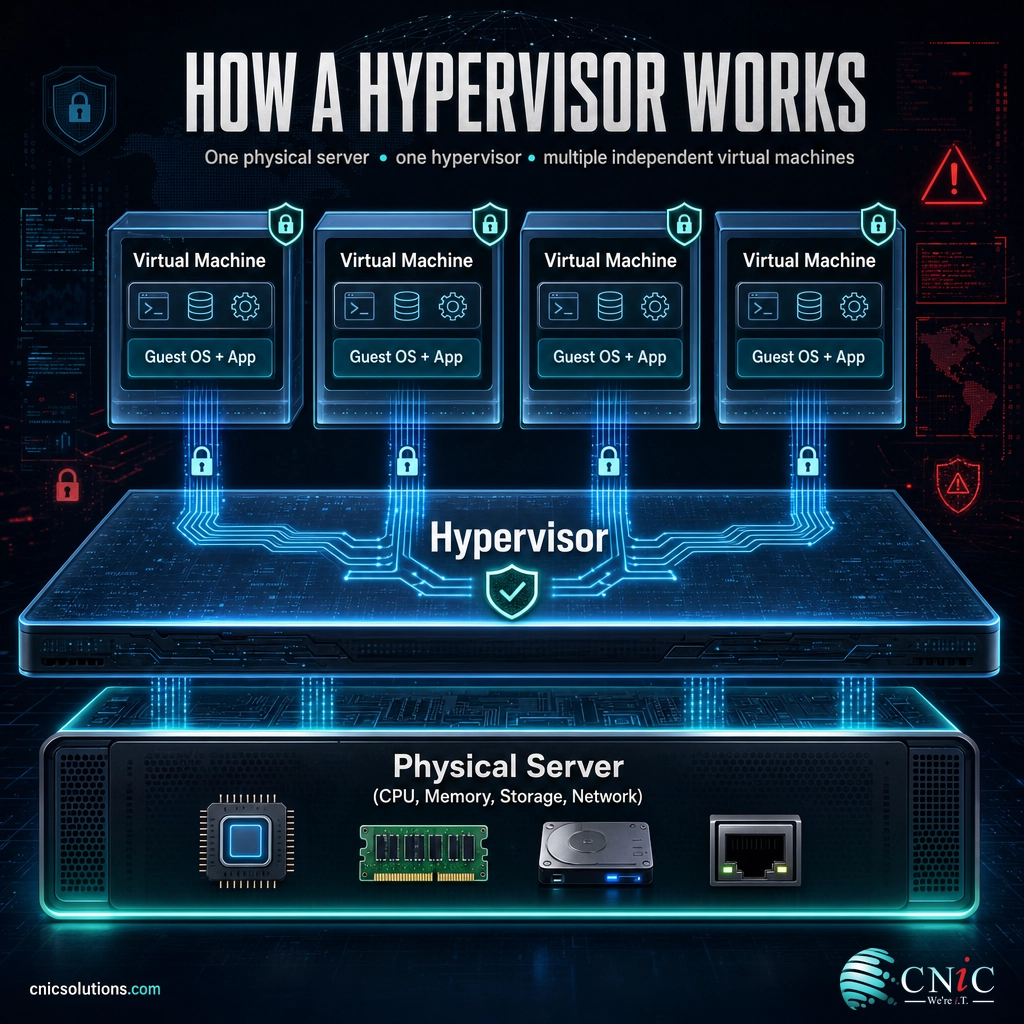
A hypervisor is a piece of software that creates and runs virtual machines. A virtual machine, or VM, is a complete computer built in software: it has its own operating system, its own applications, and its own slice of memory and storage, yet it lives inside a physical host alongside other virtual machines. The hypervisor is what makes that possible. The U.S. National Institute of Standards and Technology defines a hypervisor as the virtualization component that manages the guest operating systems on a host and controls the flow of instructions between those guest systems and the physical hardware. In plainer terms, it is the traffic controller sitting between real hardware and the virtual computers running on top of it.
You will also hear a hypervisor called a virtual machine monitor, or VMM. The two names mean the same thing. Whatever you call it, its job is to take one set of physical resources, the processor cores, the memory, the disks, the network cards, and carve them into isolated portions that each virtual machine can use as if it owned the whole machine. Each VM believes it has a computer to itself. The hypervisor keeps that illusion intact and stops any one virtual machine from reaching into another.
That isolation is the point. Because the hypervisor holds the boundary between virtual machines, a crash, a misconfiguration, or an attack inside one VM does not automatically spread to the others on the same host. This is why virtualization became the foundation of both the modern data center and the public cloud: it lets many independent workloads share one physical machine safely, instead of demanding a separate box for every job.
Source: NIST Computer Security Resource Center glossary: hypervisor (NIST SP 800-125)
How a Hypervisor Works
The mechanics are simpler than the jargon suggests. A hypervisor takes control of the physical hardware, then presents each virtual machine with a set of virtual hardware that looks and behaves like the real thing. When a virtual machine tries to use the processor or the disk, the hypervisor steps in, schedules that request against the real hardware, and makes sure every VM gets its fair share without stepping on the others. The typical flow looks like this:
- The hypervisor claims the hardware. It takes charge of the host’s CPU, memory, storage, and network so it can hand those resources out on its own terms.
- It creates virtual machines. Each VM is given its own virtual CPU, memory, disk, and network adapter, defined in software rather than built from separate physical parts.
- Guest operating systems boot inside the VMs. Windows, Linux, or another OS installs into each virtual machine and runs as though it were on a dedicated computer.
- The hypervisor schedules and isolates. As the virtual machines run, it constantly divides real resources among them, enforces limits, and keeps each one walled off from the rest.
- Resources flex as needs change. Memory and processing can be added, trimmed, or shifted between virtual machines, and a whole VM can be paused, copied, or moved to another host.
A useful way to picture it is an apartment building. The land and the structure are the physical server. The hypervisor is the building management that divides the space into separate apartments, meters the utilities, and makes sure one tenant’s noise or plumbing problem stays in their unit. Each apartment, a virtual machine, has its own front door and its own occupants, and no tenant can walk through the wall into the apartment next door. One building, many self-contained homes, one manager keeping them apart. That is a hypervisor running a host full of virtual machines.
This is also the cleanest way to see why a hypervisor is not the same thing as a virtual machine, a point worth pinning down before going further.
Myth: a hypervisor and a virtual machine are the same thing. They are not. The hypervisor is the software layer that does the managing; a virtual machine is one of the isolated computers it creates and runs. A single hypervisor usually oversees many virtual machines at once on one physical host. Mixing up the two is like confusing the building manager with one of the apartments. Keep the roles straight: the hypervisor manages, the virtual machines are what it manages.
Type 1 vs. Type 2 Hypervisors
Hypervisors come in two kinds, and the difference comes down to where the hypervisor sits in relation to the hardware. NIST draws the line clearly: the hypervisor can be installed either directly on the hardware, which makes it a Type 1 or bare-metal hypervisor, or on top of a conventional host operating system, which makes it a Type 2 or hosted hypervisor. Once you have that distinction, the products on the market stop being confusing, because nearly every one is a version of these two.
1Type 1 Hypervisor (Bare-Metal)
A Type 1 hypervisor installs straight onto the physical hardware, with nothing between it and the machine. Because there is no general-purpose operating system underneath consuming resources or adding attack surface, a bare-metal hypervisor is fast, efficient, and the standard choice for running production servers. This is what powers business data centers and the public cloud. Common examples include VMware ESXi, Microsoft Hyper-V, the open-source KVM built into Linux, and Xen. From a security standpoint, NIST notes that a Type 1 hypervisor is generally preferred, precisely because it avoids the extra vulnerabilities that a host operating system would bring.
2Type 2 Hypervisor (Hosted)
A Type 2 hypervisor runs as an ordinary application on top of an existing operating system, the same way a web browser or a word processor does. The host OS, such as Windows or macOS, deals with the hardware, and the hypervisor sits above it running virtual machines inside that environment. This is convenient for individual users: a developer testing software on several operating systems, or someone running one specific application in a VM on their laptop. Examples include Oracle VirtualBox, VMware Workstation, and Parallels Desktop. The trade-off is performance and isolation. Because every request passes through the host OS first, a hosted hypervisor is slower and less isolated than a bare-metal one, which is why it belongs on desktops and test benches rather than in a server room.
| Factor | Type 1 (Bare-Metal) | Type 2 (Hosted) |
|---|---|---|
| Where it installs | Directly on the hardware | On top of a host operating system |
| Performance | Near-native, very efficient | Slower, overhead from the host OS |
| Isolation and security | Strong; minimal attack surface | Weaker; depends on the host OS |
| Best for | Production servers, data centers, cloud | Development, testing, personal use |
| Examples | VMware ESXi, Microsoft Hyper-V, KVM, Xen | VirtualBox, VMware Workstation, Parallels |
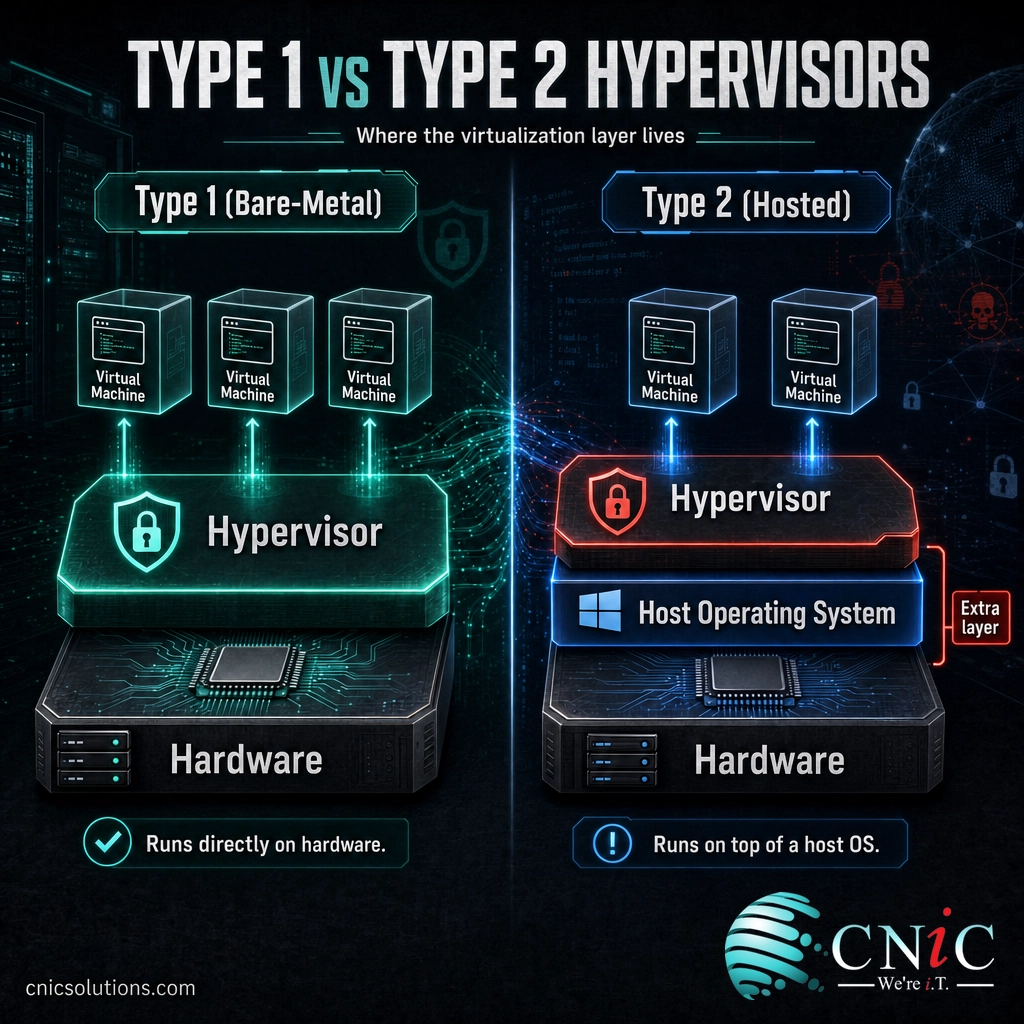
For business servers, the answer is almost always a Type 1 hypervisor. Type 2 has its place on a technician’s laptop or a developer’s workstation, but the machines that keep a company running belong on bare metal.
Source: NIST SP 800-125A Rev. 1, Security Recommendations for Server-based Hypervisor Platforms | Red Hat’s overview of hypervisors
Hypervisor vs. Container: Clearing Up the Confusion
The term a hypervisor is most often confused with today is not virtual machine but container. Containers, popularized by tools like Docker and Kubernetes, also run several isolated workloads on one machine, so people reasonably ask whether they are the same idea. They are related but they virtualize at different levels, and the difference matters when you decide what to run where.
A hypervisor virtualizes the hardware. Each virtual machine it creates carries a full, separate operating system, which is why VMs are strongly isolated but relatively heavy: booting one means booting an entire OS. A container virtualizes the operating system instead. Many containers share a single host OS kernel, packaging only an application and the files it needs. That makes containers far lighter and faster to start, but with a thinner boundary between them than full virtual machines provide. Neither one wins outright. Virtual machines give you stronger isolation and the freedom to run different operating systems side by side; containers give you speed and density for many instances of similar workloads. Most modern environments use both, often running container platforms inside virtual machines on top of a hypervisor.
| Factor | Hypervisor / Virtual Machines | Containers |
|---|---|---|
| What it virtualizes | The physical hardware | The operating system |
| Operating system | Each VM has its own full OS | All containers share one host kernel |
| Isolation | Strong, hardware-level separation | Lighter, process-level separation |
| Size and startup | Larger; boots a whole OS | Small; starts in seconds |
| Best for | Mixed operating systems, strong isolation | Many lightweight, similar app instances |
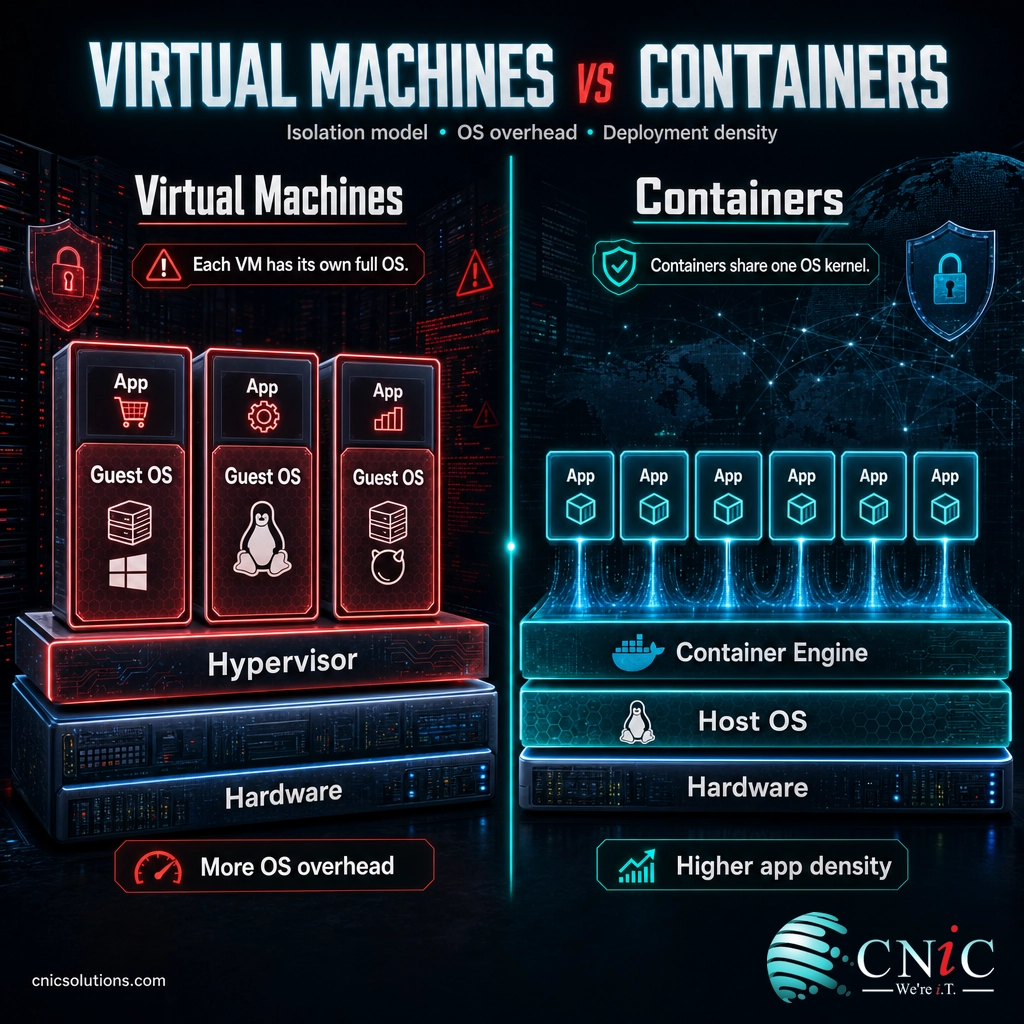
The short version: a hypervisor is the right tool when you need full, strongly isolated machines, and containers are the right tool when you need many lightweight app instances quickly. They complement each other more often than they compete.
Source: VMware’s explanation of hypervisors and virtual machines

Why Hypervisors Matter for Your Business
Hypervisors can feel like deep infrastructure that only data center engineers need to think about. In practice, they shape your hardware budget, your power bill, your recovery time after a failure, and how quickly you can stand up something new. The reason comes down to a problem virtualization solved: physical servers were badly underused.
Before virtualization became standard, a dedicated server spent most of its life nearly idle. According to ENERGY STAR’s guidance on server virtualization, average server utilization sat at just 12 to 18 percent, meaning companies were buying, powering, and cooling machines that ran at a fraction of their capacity. A hypervisor fixes that by stacking several of those underused workloads onto one physical host. ENERGY STAR notes that consolidating around six physical servers onto a single host is average, and that packing ten or more onto one machine is not unusual.
Server Consolidation Per Physical Host (ENERGY STAR)
A hypervisor commonly runs about six workloads on one physical host, and ten or more is achievable. Source: ENERGY STAR, Virtualize Servers.
That consolidation turns into real money. ENERGY STAR estimates that decommissioning a single standard rack server saves roughly $500 a year in energy alone, and it points to a college that ran 35 virtual servers on just four physical hosts and saved more than $280,000 over three years. For a small or midsize business, the same math means fewer machines to buy and maintain, a smaller power and cooling bill, and less rack space to rent.
The benefits go beyond the budget. Because a virtual machine is just software, it can be backed up as a single file, copied, and restored on different hardware to recover from a failure far faster than rebuilding a physical server. A hypervisor can move a running workload from one host to another to dodge downtime during maintenance. And spinning up a new server becomes a matter of minutes instead of a hardware purchase. This flexibility is exactly why virtualization sits at the heart of well-run infrastructure that is designed and monitored as one system, and why the same hypervisor technology underpins the cloud services most businesses now depend on.
Source: ENERGY STAR: Virtualize Servers
How to Get Started with Virtualization
You rarely adopt a hypervisor for its own sake. The right move follows from a goal, so start with the problem you want to solve rather than the product.
- To get more out of your servers: a Type 1 hypervisor lets you consolidate several underused physical machines onto one host, cutting hardware, power, and space.
- To improve recovery and uptime: virtualized workloads back up as files and restore on different hardware quickly, and can be moved between hosts to avoid downtime during maintenance.
- To deliver flexible desktops: the same virtualization foundation runs virtual desktop infrastructure and cloud-hosted desktop as a service for a mobile or hybrid workforce.
- To decide where workloads should live: hypervisors are the common thread in the choice between running your own servers and using the cloud, covered in our guide to cloud versus on-premise infrastructure.
The harder part is not installing a hypervisor but designing the virtual environment so it is sized correctly, backed up, patched, and secured, without becoming a single point of failure where one host outage takes down everything at once. That is a design and management decision, and for most small and midsize businesses the practical path is to have virtualization planned and run as part of the wider infrastructure. If the cloud is part of your plan, the same expertise applies to the virtualized environments behind cloud services.
Get Help Designing Your Virtual Infrastructure
Common Questions About Hypervisors
What is a hypervisor in simple terms?
What is the difference between a Type 1 and Type 2 hypervisor?
Is a hypervisor the same as a virtual machine?
What is the difference between a hypervisor and a container?
Do small businesses actually use hypervisors?
Related Terms
- Virtual machine (VM): a complete computer built in software, with its own operating system, that runs on a physical host under a hypervisor’s control.
- Type 1 hypervisor (bare-metal): a hypervisor installed directly on hardware, used for production servers, data centers, and the cloud.
- Type 2 hypervisor (hosted): a hypervisor that runs as an app on top of a normal operating system, used for testing and personal virtualization.
- Container: a lightweight package that shares the host operating system kernel instead of virtualizing hardware; faster than a VM but with thinner isolation.
- Virtual desktop infrastructure (VDI): desktops delivered from virtual machines running on hypervisors in a data center, then streamed to the user.
- Desktop as a service (DaaS): cloud-hosted virtual desktops run and managed by a provider on top of the provider’s hypervisors.
- Server consolidation: combining several underused physical servers into virtual machines on one host to cut cost, power, and space.
- Live migration: moving a running virtual machine from one physical host to another with little or no downtime.
About This Guide
Definitions in this article follow primary and authoritative sources rather than secondary write-ups. The core definition of a hypervisor and the Type 1 versus Type 2 distinction are drawn from the U.S. National Institute of Standards and Technology (NIST), specifically the NIST glossary and NIST SP 800-125A. Architecture descriptions are stated in line with vendor technical documentation from Red Hat and VMware. Utilization, consolidation, and savings figures come from ENERGY STAR, a program of the U.S. Environmental Protection Agency, citing its own guidance and a published case study. CNiC Solutions is a Houston-based managed IT and infrastructure provider; this article is educational and not a substitute for an assessment of your specific environment.
Sources:
NIST CSRC glossary: hypervisor (SP 800-125) |
NIST SP 800-125A Rev. 1: Server-based Hypervisor Platforms |
ENERGY STAR: Virtualize Servers |
Red Hat: What Is a Hypervisor? |
VMware: What Is a Hypervisor?
Get a Free Consultation on Your IT



related posts
What Is a Load Balancer? How It Keeps Applications Fast and Reliable
October 7, 2026A load balancer is a device or piece of software that sits in front of your…
What Is a Firmware Update and Why It Matters for Security
October 6, 2026A firmware update is a manufacturer-issued revision to the low-level software built into a device, such…
What Is a Human Firewall? Turning Employees Into Your Best Defense
October 6, 2026A human firewall is the group of employees who, through security awareness and good habits, act…
What Is a Distributed System? How It Works and Why It Matters
October 5, 2026A distributed system is a collection of independent computers, called nodes, that are connected over a…