

Cloud migration is the process of moving an organization’s digital assets, such as data, applications, and workloads, from on-premises infrastructure or one cloud environment into another cloud. Businesses migrate to gain scalability, cut hardware and maintenance costs, and access systems securely from anywhere. The move is a project, not a switch, and how you plan it decides the result.
Almost every business now runs part of its operation in the cloud, and the pull to move more is only getting stronger. But “moving to the cloud” is not a single button. It is a planned relocation of the systems your business depends on, with real choices about what to move, how to move it, and what to change along the way. This guide explains what cloud migration actually is, how the process works, the strategies you can choose from, and what it takes to migrate without breaking the things that keep your business running.
- Migration is a relocation, not an upgrade. It is the act of moving workloads to the cloud. Cloud computing is the destination, and the two terms are often confused.
- There are six ways to migrate. The 6 Rs (rehost, replatform, repurchase, refactor, retire, retain) define how much each application changes on the way, and each has a different cost and payoff.
- The market is enormous and still growing. Gartner forecasts worldwide public cloud spending will reach roughly $723 billion in 2025, growing more than 21% in a single year.
- Multi-cloud is now the norm. Flexera found 89% of organizations use more than one cloud, which makes planning and cost control harder, not simpler.
- Cost and security are managed, not automatic. The cloud can save money and improve security, but only with governance. Managing cloud spend is the single biggest challenge organizations report.
What’s in This Guide
- What Is Cloud Migration?
- How Cloud Migration Works
- Cloud Migration vs. Cloud Computing
- Why Cloud Migration Matters for Your Business
- The 6 Strategies of Cloud Migration (the 6 Rs)
- Common Cloud Migration Challenges
- How to Get Started with Cloud Migration
- Common Questions About Cloud Migration
- Related Terms
What Is Cloud Migration?
Cloud migration is the process of moving digital assets into a cloud computing environment. Those assets can be data, applications, email, databases, or entire workloads, and the “before” state can be a physical server room, a leased data center, or even a different cloud provider. The end goal is to run those systems on infrastructure that someone else owns, maintains, and scales on demand.
To understand the destination, it helps to use an authoritative definition of the cloud itself. The NIST definition of cloud computing (SP 800-145) describes it as on-demand network access to a shared pool of configurable computing resources that can be provisioned and released with minimal management effort. NIST breaks the cloud into three service models (IaaS, PaaS, and SaaS) and four deployment models (public, private, hybrid, and community). Cloud migration is the work of moving your systems into one or more of those models.
The most important thing to understand up front is that migration is a project with a beginning and an end, not a setting you toggle. It involves deciding which systems move, in what order, using which strategy, and how you will verify that everything still works afterward. Done well, it is nearly invisible to your staff and customers. Done carelessly, it causes outages, surprise bills, and security gaps. The rest of this guide is about doing it the first way.
Source: NIST Special Publication 800-145, The NIST Definition of Cloud Computing
How Cloud Migration Works
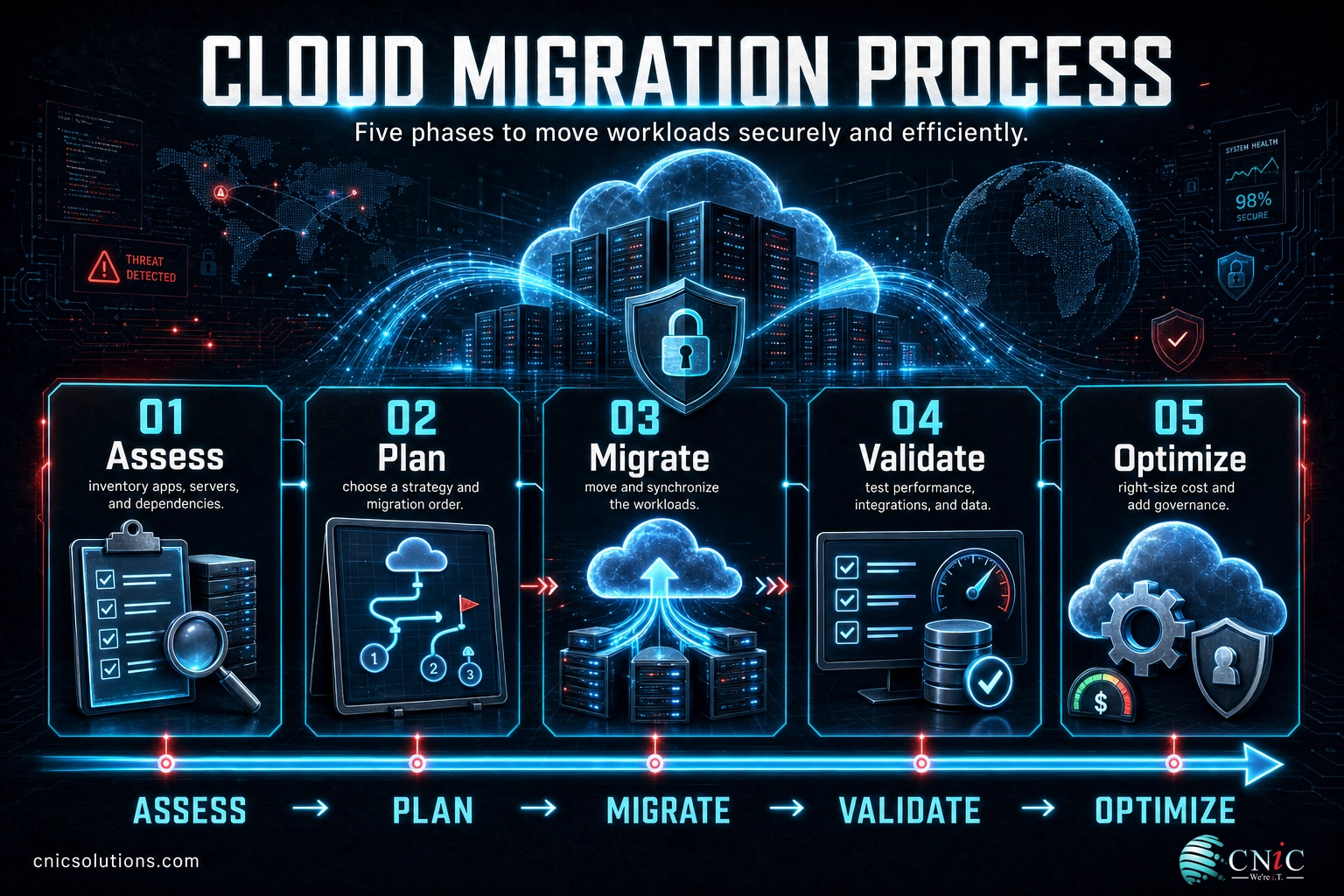
A sound migration follows a repeatable sequence. The exact names vary by provider, but the phases below capture what actually happens on a well-run project. Skipping the early planning steps is the most common reason migrations run over budget or cause downtime.
- Assess. Inventory every application, server, and dependency you have. Identify what talks to what, what is business-critical, and what is quietly obsolete. This discovery step is where you find the surprises before they find you.
- Plan. Choose a migration strategy for each workload (see the 6 Rs below), decide the order of moves, set a target architecture, and define success. Interdependent systems usually move together so nothing is left stranded.
- Migrate. Move the workloads. This can be a live transfer with replication or a scheduled cutover during a maintenance window. Data is copied and synchronized, then traffic is pointed to the new environment.
- Validate. Test everything. Confirm that applications perform, integrations still connect, data is intact, and users can work. Nothing is declared “done” until it is verified under real conditions.
- Optimize. Once stable, tune for cost and performance. Right-size resources, turn off what you overprovisioned, and put governance in place so spend does not drift upward over time.
A useful way to picture this is moving offices. You do not throw everything into a truck at once. You take inventory, label boxes, decide what to keep and what to donate, move in a planned order, then confirm the phones and internet work before anyone sits down. A cloud migration is that same disciplined relocation, applied to the systems your business runs on.
The single biggest predictor of a smooth migration is the quality of the assessment. When teams migrate workloads they never fully mapped, they discover hidden dependencies mid-move, which is when outages happen. This is why many businesses bring in an experienced partner for the discovery and planning phases even when their internal team handles the rest. Getting professional help with the fundamentals of cloud computing for business before a big move pays for itself in avoided downtime.
Cloud Migration vs. Cloud Computing
The terms “cloud migration” and “cloud computing” are used almost interchangeably, and that is the number one point of confusion. They are related but distinct. Cloud computing is the model of delivering computing resources over the internet. Cloud migration is the act of moving your systems into that model. One is the destination; the other is the trip.
| Attribute | Cloud Migration | Cloud Computing |
|---|---|---|
| What it is | A process or project | A delivery model / technology |
| Answers the question | “How do we get there?” | “What are we using?” |
| Timeframe | Temporary, has a start and end | Ongoing, once you are running |
| Main concern | Downtime, data integrity, sequencing | Scalability, uptime, ongoing cost |
| Example | Moving your email to Microsoft 365 | Running your email in Microsoft 365 |
A second term that gets tangled in here is “lift and shift,” which is one specific migration strategy (rehosting), not a synonym for migration itself. Lift and shift means moving an application to the cloud with little or no change to it. It is fast and low-risk, but it is only one of six approaches. Treating “lift and shift” as the only way to migrate leads businesses to skip strategies that would save far more money long term. We break all six down below.
Why Cloud Migration Matters for Your Business
Cloud migration is no longer an edge decision reserved for tech companies. It has become the default direction for business infrastructure, and the numbers show how decisively the market has shifted.
Spending is the clearest signal. Gartner forecasts that worldwide end-user spending on public cloud services will reach roughly $723 billion in 2025, an increase of more than 21% in a single year. That is not early-adopter money. It is mainstream business budgets moving from owned hardware to rented, scalable capacity.
The other reality is that “the cloud” is rarely one cloud. Flexera’s 2024 State of the Cloud Report found that 89% of organizations use more than one cloud provider. Most businesses now run a mix of public cloud, private cloud, and on-premises systems at the same time. That makes a well-planned migration more important, not less, because moving a workload means fitting it into an environment that already has moving parts.
For a small or midsize business, the practical benefits of a good migration are concrete: you stop buying and refreshing expensive server hardware, you gain capacity that scales up or down with demand, your team can work securely from anywhere, and disaster recovery becomes far more achievable. Those are the outcomes that make the project worth the effort, and they are the reason cloud is now central to most modern IT infrastructure planning.
Source: Gartner, Worldwide Public Cloud End-User Spending Forecast | Flexera 2024 State of the Cloud Report
The 6 Strategies of Cloud Migration (the 6 Rs)
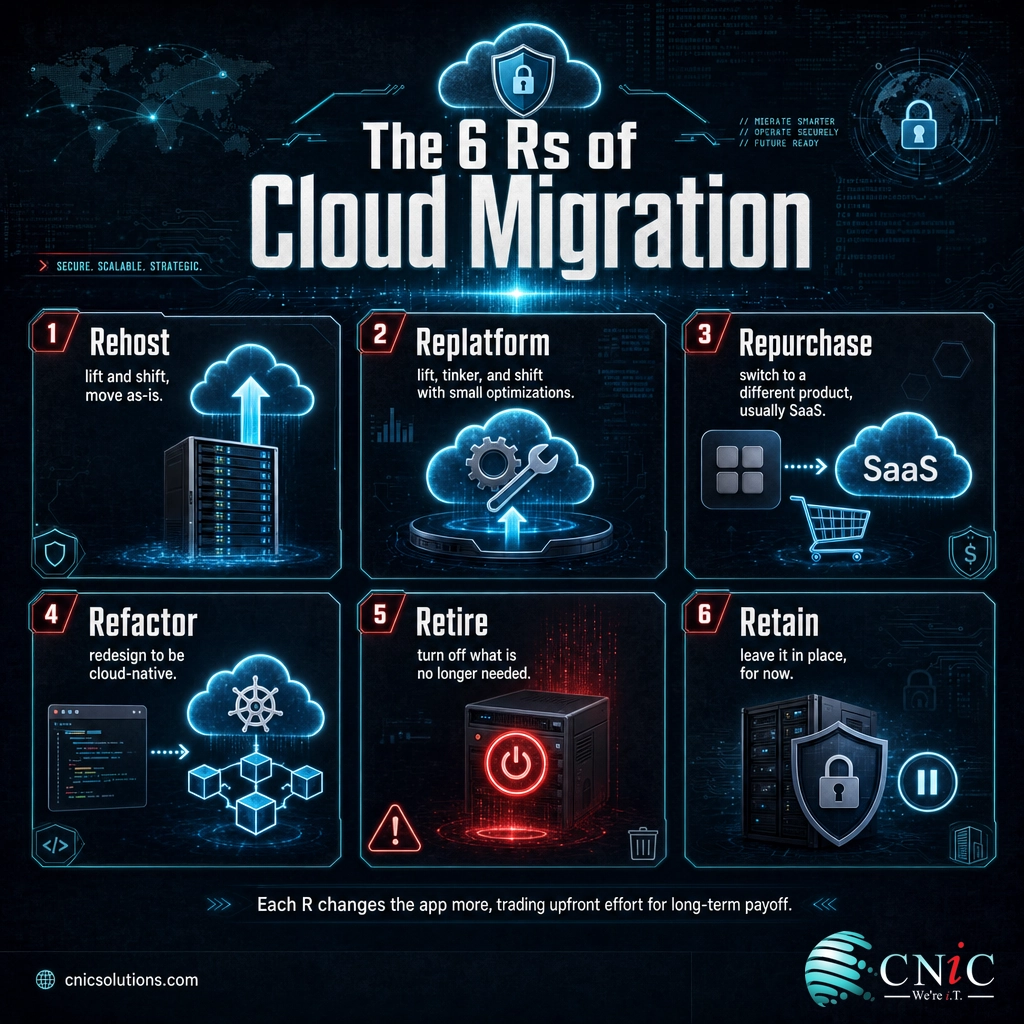
Not every application should move to the cloud the same way. The industry-standard framework for this decision is the 6 Rs, which began as five migration strategies Gartner outlined in 2011 and were later expanded by AWS in its migration strategy guidance. Each “R” describes how much you change an application on its way to the cloud, trading upfront effort against long-term payoff.
| Strategy | What it means | Best when |
|---|---|---|
| Rehost (lift and shift) | Move the application as-is, with little or no change | You need speed and low upfront risk |
| Replatform (lift, tinker, and shift) | Move it with small cloud optimizations, no core rewrite | A few tweaks unlock real cloud benefits |
| Repurchase | Drop the old app and move to a different product, usually SaaS | A ready-made cloud service does the job better |
| Refactor (re-architect) | Redesign the app to be cloud-native | You need scale or features the old design cannot deliver |
| Retire | Turn it off because it is no longer needed | Discovery reveals the app is redundant or unused |
| Retain (revisit) | Leave it where it is, for now | It is not ready, or there is no business case yet |
The strategies are not ranked from worst to best. A mature migration usually applies several across a portfolio: rehost the simple, stable systems to move fast; repurchase an aging tool for a modern SaaS equivalent; refactor the one application that will define your competitive edge; and retire the three servers nobody realized were still running. Choosing the right R for each workload is where an experienced migration plan earns its keep, and it is also where a strategic technology leadership perspective helps prioritize what moves first.
Source: AWS, 6 Strategies for Migrating Applications to the Cloud
Common Cloud Migration Challenges
Cloud migration delivers real benefits, but it is not automatically cheaper or safer. Two assumptions cause more trouble than any others, and both deserve to be corrected before you plan a move.
Myth: moving to the cloud automatically saves money. It does not. Without governance, cloud spend tends to climb, because it is so easy to spin up resources and forget them. Flexera’s research consistently finds that managing cloud spend is the single biggest challenge organizations report, and that a meaningful share of cloud spending is wasted. The savings are real, but they come from right-sizing, monitoring, and cost governance after the migration, not from the migration itself.
The second challenge is security, and it is widely misunderstood. Public cloud providers operate on a shared responsibility model. The provider secures the underlying infrastructure, but you remain responsible for how you configure it, who has access, and how your data is protected. The majority of cloud security incidents trace back to customer-side misconfiguration, not to a failure of the cloud platform. A migration is actually a good moment to strengthen security, because you are rebuilding access and architecture anyway, but only if security is designed in rather than bolted on afterward. This is why pairing a migration with a review of your business cybersecurity posture is a smart sequence.
Other common hurdles include unexpected downtime from unmapped dependencies, data loss when transfers are not verified, application performance issues after a naive lift and shift, and skills gaps on the internal team. Every one of these is addressable in the planning phase. None of them is a reason to avoid the cloud, and each is a reason to migrate deliberately rather than in a rush.
How to Get Started with Cloud Migration
You do not have to move everything at once, and you should not. The lowest-risk path for most businesses is to start with a single, well-contained workload, prove the process, then expand. Here is a practical way to begin.
- Pick a pilot workload. Choose something valuable but self-contained, such as email or file storage, so you can learn the process without betting the business on it.
- Run a real assessment. Map dependencies, estimate costs honestly, and decide the strategy (the right R) for that workload before you touch anything.
- Define success and a rollback plan. Know exactly what “working” looks like and how you will reverse course if it is not, before the cutover.
- Migrate, validate, then optimize. Move the pilot, confirm it works under real use, tune the cost, and capture what you learned for the next workload.
- Scale the plan. Repeat the pattern across your remaining systems in priority order, carrying governance and cost controls forward each time.
The decision most businesses face is not whether to migrate but whether to do it alone. A cloud migration touches your most important systems, and mistakes are expensive to undo. Working with a managed IT provider gives you the assessment discipline, the migration experience, and the ongoing cost and security governance that turn a risky project into a routine one. If you want a partner to plan and execute the move, that is exactly what CNiC Solutions’ cloud team does.
Plan Your Move With CNiC’s Cloud Team
Protect Your Data Before You Migrate
Common Questions About Cloud Migration
What is cloud migration?
What are the main types of cloud migration?
How long does a cloud migration take?
Is cloud migration secure?
How much does cloud migration cost?
Related Terms
- Cloud computing: the delivery of computing resources over the internet, and the destination that cloud migration moves you toward.
- Lift and shift (rehosting): moving an application to the cloud with little or no change, the fastest of the 6 Rs.
- Hybrid cloud: a mix of public cloud, private cloud, and on-premises systems working together, a common end state after migration.
- Shared responsibility model: the security split where the provider secures the infrastructure and the customer secures configuration, access, and data.
- Cloud cost optimization: the ongoing practice of right-sizing and governing cloud spend so it does not drift upward. Learn proven techniques to reduce cloud costs.
- Cloud repatriation: the reverse move, bringing a workload back from the cloud when it fits better on-premises. See when moving workloads back makes sense.
- Email migration: a common first cloud project, such as moving email to Microsoft 365.
- Disaster recovery: the plan and tooling for restoring systems after failure, far more achievable once workloads are in the cloud.
About This Guide
The definition of cloud computing and its service and deployment models follow NIST Special Publication 800-145, the standard U.S. reference. Public cloud spending figures are from Gartner’s worldwide public cloud end-user spending forecast. Multi-cloud adoption and cloud-spend challenge data are from Flexera’s 2024 State of the Cloud Report. The 6 Rs migration framework originated as Gartner’s five strategies (2011) and was expanded by AWS. Figures are cited to their original sources to illustrate the scale and structure of cloud migration, not as guaranteed outcomes for any specific business.
Sources: NIST SP 800-145 | Gartner public cloud spending forecast | Flexera 2024 State of the Cloud Report | AWS, 6 Strategies for Migrating Applications to the Cloud
Get a Free IT and Cloud Consultation



related posts
What Is a Hypervisor? Types and How They Work
October 7, 2026A hypervisor is software that lets a single physical computer run many separate virtual machines at…
What Is a Load Balancer? How It Keeps Applications Fast and Reliable
October 7, 2026A load balancer is a device or piece of software that sits in front of your…
What Is a Human Firewall? Turning Employees Into Your Best Defense
October 6, 2026A human firewall is the group of employees who, through security awareness and good habits, act…
What Is a Firmware Update and Why It Matters for Security
October 6, 2026A firmware update is a manufacturer-issued revision to the low-level software built into a device, such…