

Fully managed IT means an outside provider runs your entire technology function as your outsourced IT department. Co-managed IT means you keep your internal team and add a provider to fill specific gaps. The deciding question is simple: do you have IT staff worth keeping, or do you need someone to be the whole department?
Choosing between fully managed and co-managed IT is really a choice about what to do with the people who already run your technology. Pick fully managed when you have no internal team, and a provider steps in as the whole department. Pick co-managed when you have capable staff who cannot cover everything alone, and a provider reinforces them. Get the match wrong and you pay for it either way: buying a complete provider team when you already employ IT, or running an overloaded internal team that quietly leaves gaps in security and coverage. Organizations with a severe security skills shortage paid an average of 1.76 million dollars more per data breach than well-staffed peers, according to IBM, which is exactly the kind of gap the right model is meant to close.
Key Takeaways
- The difference is who owns the work. Fully managed hands the entire IT function to a provider; co-managed splits it between your internal team and the provider.
- Fully managed fits businesses with little or no internal IT. You get a complete outsourced department and a single point of accountability.
- Co-managed fits businesses that already employ capable IT. You keep your people and their knowledge of your business, and buy only the specialized skills and coverage they lack.
- Cost depends on your starting point. With an existing team, co-managed is usually cheaper; with no team, fully managed usually is.
- The talent gap drives both models. The global cybersecurity workforce is short an estimated 4.8 million people, and 90 percent of organizations report skills gaps, which is why so many businesses now buy expertise instead of trying to hire it.
At a glance: the two models side by side
Fully Managed IT
- Provider acts as your complete IT department
- Best when you have little or no internal IT staff
- One provider is accountable for everything
- Usually a predictable flat monthly fee
- You delegate day-to-day control
Co-Managed IT
- Provider works alongside your internal team
- Best when you have capable staff worth keeping
- Accountability is shared and must be defined clearly
- You buy only the gaps you cannot cover in-house
- You keep control and institutional knowledge
What’s in This Guide
- Understanding Fully Managed IT
- Understanding Co-Managed IT
- Control and Ownership
- Cost and Pricing
- Coverage and Scalability
- Security and Specialized Expertise
- Fully Managed vs Co-Managed: The Full Comparison
- Who Should Choose Fully Managed IT
- Who Should Choose Co-Managed IT
- The Verdict: Which Model Fits Your Business
- Frequently Asked Questions
Understanding Fully Managed IT
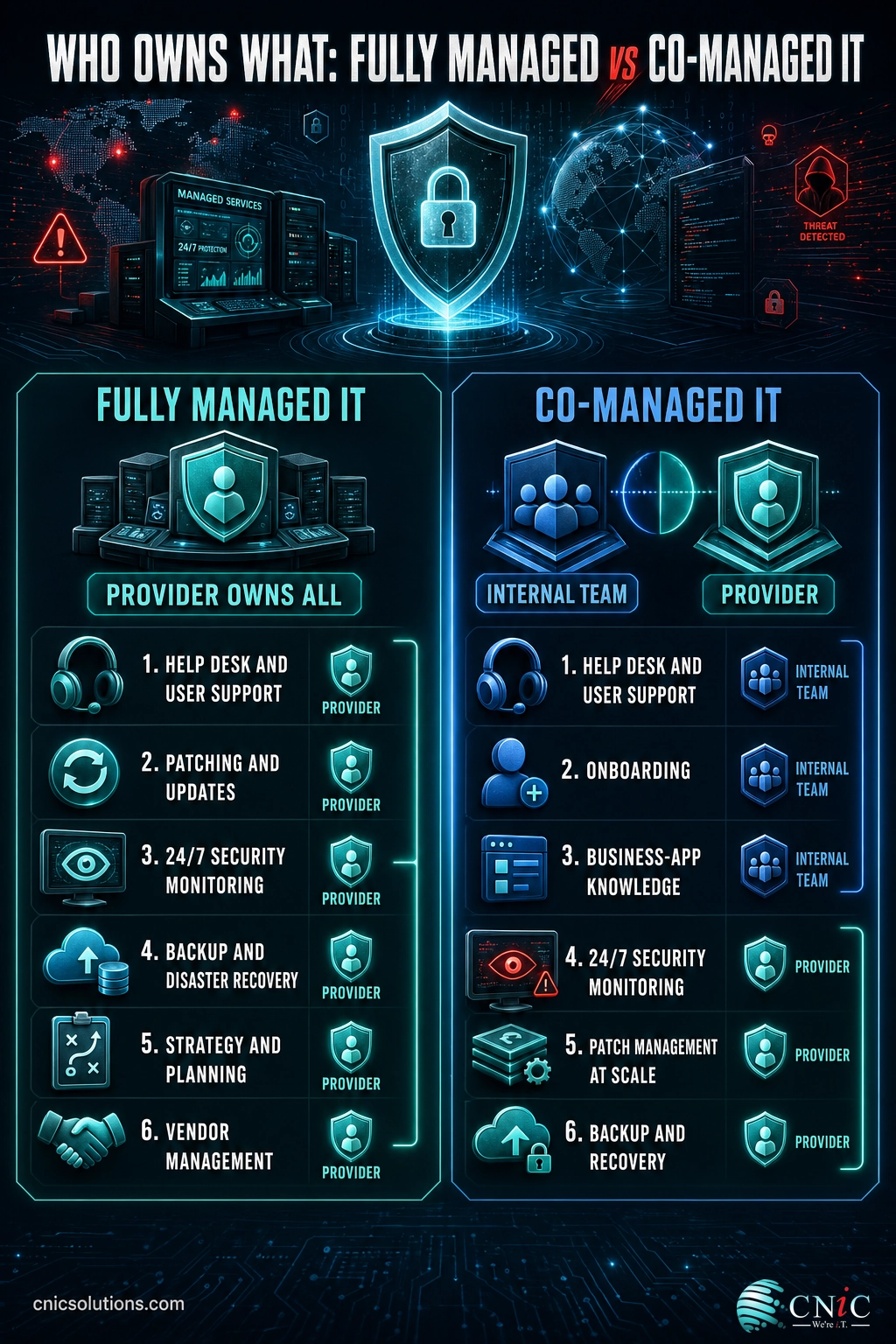
Fully managed IT is the model most people picture when they hear “outsourced IT.” An external provider, usually a managed service provider (MSP), takes ownership of your entire technology environment. That includes the day-to-day help desk, user support, patching, monitoring, cybersecurity, backups, vendor management, and long-term strategic planning. In practice, the provider becomes your IT department, and you often keep little or no technical staff on payroll.
The appeal is coverage and simplicity. Instead of hiring, training, and retaining a team across a dozen disciplines, you sign one agreement and hold one company accountable for everything. Most fully managed arrangements run on a predictable flat monthly fee, which turns unpredictable technology costs into a line item you can budget around. This is the natural next step for a business moving off an old reactive setup where you only called for help when something broke.
Who it fits: businesses with no internal IT and no desire to build a team, companies whose environment is small and standardized enough for one provider to run end to end, and owners who want a single throat to choke rather than a shared arrangement.
Genuine trade-offs: you hand over day-to-day control, and the deep knowledge of how your business runs tends to live with the provider rather than inside your walls. For many businesses that is a fair exchange. For others, particularly those in regulated industries, keeping that control and knowledge in-house matters enough to change the decision.
Understanding Co-Managed IT
Co-managed IT is the middle option, and it is the one businesses most often overlook. Instead of replacing your internal team or leaving it to cover everything alone, a co-managed arrangement brings in an outside provider to work alongside your staff. Each side owns the parts it is best positioned to handle. Your people keep the work that depends on knowing your business, and the provider takes on the responsibilities that need scale, specialized skills, or round-the-clock attention.
The defining trait is shared ownership. A typical split leaves the help desk, employee onboarding, and business-specific applications with your internal team, while the provider handles 24/7 security monitoring, patch management, backup and recovery, compliance tooling, and specialized projects such as cloud migrations. For a deeper breakdown of how that division of labor works and when it wins, our guide to when co-managed IT beats full outsourcing walks through the full model.
Who it fits: businesses that already employ competent IT people worth keeping, teams that are overloaded rather than incapable, and companies that need specialist expertise (security, cloud, compliance) they cannot justify hiring full time.
Genuine trade-offs: accountability is shared, which is a strength when responsibilities are documented clearly and a liability when they are vague. A co-managed relationship only works if both sides agree, in writing, on exactly who owns what. It also assumes you have an internal team to build around. Without one, there is nothing to co-manage.
Control and Ownership
The clearest dividing line between the two models is who holds the keys. Under fully managed IT, the provider owns the environment and makes most of the day-to-day decisions. That is the point: you are paying to not have to think about it. For a business with no internal expertise, delegating that control is a relief rather than a loss, because there was no one in-house to exercise it well anyway.
Co-managed IT keeps ownership and decision-making inside your business. Your team stays in charge of the work it does best, and the provider operates within a defined lane. For companies in healthcare, finance, or legal, where accountability and sensitive knowledge need to stay in-house for compliance reasons, that retained control is often the deciding factor. It is also why co-managed pairs naturally with strategic guidance: many arrangements add a virtual security leader to keep high-level decisions aligned with the business without giving them away.
Winner: it depends on your goal. If you want to offload control entirely, fully managed wins. If you need to keep control and institutional knowledge in-house, co-managed wins. This is the one criterion where the “better” answer is genuinely dictated by what you want, not by the model itself.
Cost and Pricing
Cost is where the wrong choice gets expensive, and it is also where the most common myth lives. Fully managed IT usually carries a predictable flat monthly fee that covers the whole environment. That single number is easy to budget and often lower than the fully loaded cost of employing an equivalent in-house team once salaries, benefits, tools, and turnover are counted. If you have no internal staff, fully managed is frequently the cheaper path to complete coverage.
Co-managed pricing works differently. You pay only for the specific gaps you cannot cover in-house, so the monthly figure is typically smaller than a full provider fee. But that number sits on top of the internal team you already employ. The math only favors co-managed when you genuinely have staff worth keeping. For a detailed breakdown of what each model actually costs, our guide to managed IT pricing models lays out the numbers, and our look at the real costs of outsourcing IT covers the budgeting side.
Myth: co-managed IT is always the cheaper option because you keep staff in-house. Not true. If you do not already have internal IT, co-managed is usually the more expensive route, because you would be paying to build and maintain a team and paying a provider on top of it. Co-managed only saves money when there is an existing team worth supporting. With no team, fully managed almost always delivers more coverage per dollar.
Winner: whichever matches your headcount. No internal IT means fully managed is the more efficient spend. An existing, capable team means co-managed lets you protect that investment and buy only what is missing. Cost is not decided by the model; it is decided by what you already pay for.
Coverage and Scalability
The value of any IT model shows up most when something goes wrong at 2 a.m. Fully managed providers are built for continuous coverage: monitoring, response, and support run around the clock without any dependence on a single employee being awake or available. There is no key-person risk, no gap when your one technician takes vacation, and no scramble when a critical system fails outside business hours.
Co-managed IT closes that same coverage gap for teams that have people but not enough of them. A two-person internal team cannot realistically staff nights, weekends, and holidays without overtime or exposure. A co-managed provider fills those windows, so the business stays monitored while your staff keep normal hours. The stakes are not abstract. In an ITIC survey on the cost of downtime, 98 percent of organizations said a single hour of downtime would cost them more than 100,000 dollars, and 81 percent put the figure above 300,000 dollars per hour.
On scalability, fully managed adapts by renegotiating the overall agreement as your needs change, while co-managed flexes by expanding or trimming the provider’s scope around a stable internal core. Both scale, but co-managed offers finer-grained control over exactly what you add and when.
Winner: a slight edge to fully managed for pure, hands-off coverage, because there is no internal capacity to depend on at all. Co-managed matches the coverage but assumes your team carries part of the load. For businesses that want the monitoring handled with zero internal dependency, fully managed is the cleaner answer.
Security and Specialized Expertise
Security is the single most common reason businesses reach for outside help under either model, and the reason is a talent shortage that no small team can hire its way out of. According to the 2024 ISC2 Cybersecurity Workforce Study, the global cybersecurity workforce gap reached an estimated 4.8 million people, a 19 percent increase year over year, while 90 percent of surveyed organizations reported skills gaps on their teams. The specialists you need are scarce, expensive, and hard to keep even when you find them.
That shortage has a measurable price. IBM’s 2024 Cost of a Data Breach report found that 53 percent of breached organizations were dealing with a severe security staffing shortage, and those understaffed organizations paid an average of 1.76 million dollars more per breach than well-staffed peers: 5.74 million dollars versus 3.98 million dollars.
Average Data Breach Cost by Security Staffing Level (IBM, 2024)
Understaffed organizations paid $1.76M more per breach. Source: IBM Cost of a Data Breach 2024.
Both models solve this the same way in principle: they give you access to security specialists and enterprise-grade tooling you would struggle to build alone. The difference is scope. Fully managed folds security into the complete package the provider already runs. Co-managed lets a capable internal team hand off only the security workload it cannot sustain, often as the very first responsibility it delegates, while keeping the rest of the environment in-house. Either way, the goal is professional-grade cybersecurity coverage that a stretched internal team cannot maintain on its own. Businesses that want a dedicated security layer without touching the rest of their IT often start with a managed security provider and expand from there.
Winner: a tie on outcome, decided by your team. Both models deliver specialist security and tooling that in-house hiring rarely can. If you have no internal security capability, fully managed covers it wholesale. If you have IT staff who handle the basics but cannot run a full security program, co-managed lets you add exactly that layer without rebuilding the department.
Fully Managed vs Co-Managed: The Full Comparison
The table below lines the two models up across the criteria that actually drive the decision. As you read it, keep one question in mind: does your business already have internal IT staff worth keeping? Almost every row resolves back to that answer.
| Factor | Fully Managed IT | Co-Managed IT | Best fit for |
|---|---|---|---|
| Internal IT staff | Minimal or none | Kept and supported | Depends on your headcount |
| Who owns the work | Provider owns everything | Shared between team and provider | Fully managed for hands-off owners |
| Day-to-day control | Delegated to the provider | Retained by your team | Co-managed for regulated industries |
| Institutional knowledge | Held mostly by the provider | Stays inside the business | Co-managed |
| What you buy | A complete IT department | Only the gaps you cannot cover | Depends on what you have |
| Pricing | Predictable flat monthly fee | Scoped to the gaps, added to payroll | Fully managed with no team; co-managed with one |
| Coverage | 24/7, no internal dependency | 24/7, shared with your team | Fully managed for zero-dependency |
| Accountability | Single point of accountability | Shared, must be documented | Fully managed for simplicity |
| Scaling | Renegotiate the full agreement | Adjust the provider’s scope | Co-managed for fine control |
| Key-person risk | Eliminated | Reduced, not eliminated | Fully managed |
Source: CompTIA: Buying Guide for Managed Services | ISC2 2024 Cybersecurity Workforce Study
Who Should Choose Fully Managed IT
Fully managed IT is the stronger choice when you need a complete IT department and do not have, or do not want, one of your own. It removes the burden of hiring across every discipline and gives you a single company to hold accountable. Look for these signals:
- You have no internal IT staff and no plans to hire. A provider becomes the department you never built, which is faster and usually cheaper than staffing one from scratch.
- Your environment is small and standardized. If one provider can reasonably run the whole thing end to end, splitting responsibility just adds coordination overhead.
- You want one point of accountability. When something breaks, you want a single number to call and a single company responsible, not a shared arrangement to untangle.
- Your only technical person is a key-person risk. If one employee’s departure would leave you exposed, a provider removes that single point of failure entirely.
- You want technology off your plate. Owners who would rather focus on the business than manage an IT function get the cleanest relief from a fully managed model.
Who Should Choose Co-Managed IT
Co-managed IT is the stronger choice when you already have capable internal IT that cannot do everything alone. Rather than paying to replace knowledge you already own, you keep your people and add only what is missing. Look for these signals:
- You employ IT staff worth keeping. If your team knows your systems, your people, and your quirks, that knowledge is an asset. Co-managed protects it instead of dissolving it into a provider.
- Your team is overloaded, not incapable. When competent people are buried in tickets and cannot reach strategic work, the problem is capacity. Co-managed offloads the routine and the overflow.
- You need specialists you cannot justify hiring. Security, cloud architecture, and compliance require experts a small business rarely needs full time. Co-managed rents that expertise precisely when it is needed.
- You must keep control and knowledge in-house. Regulated industries often need decision-making and sensitive data to stay internal for accountability. Co-managed keeps control while still adding outside tooling.
- You want to add help gradually. Co-managed lets you start with the highest-risk gap, prove it works, and expand scope over time instead of committing to everything at once.
The Verdict: Which Model Fits Your Business
There is no universally correct answer, and any provider who gives you one without asking about your team is selling, not advising. The honest rule is short: fully managed IT supplies the department you do not have, while co-managed IT reinforces the one you do. Start by answering a single question, and the rest usually follows.
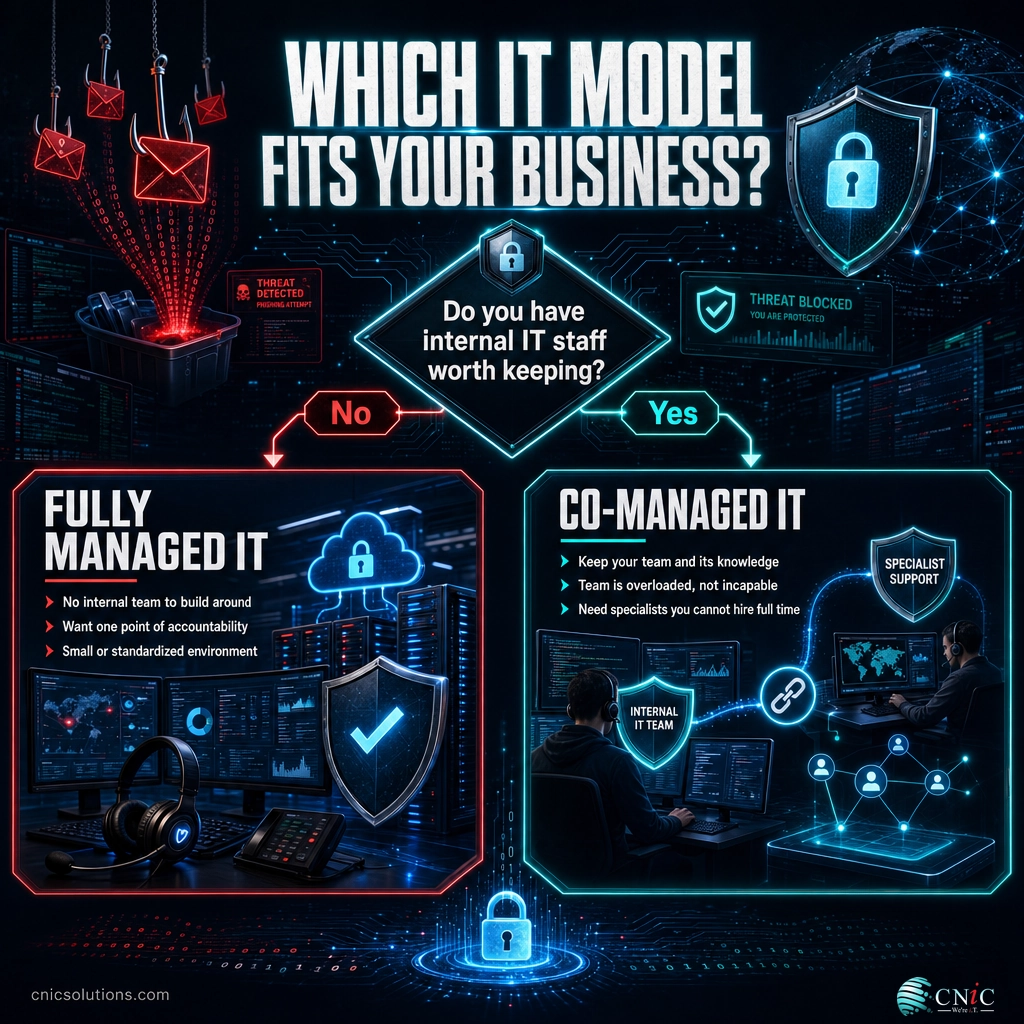
Do you have internal IT staff worth keeping? If the answer is no, fully managed IT gives you complete, accountable coverage without the cost and risk of building a team. If the answer is yes, co-managed IT lets you protect that team’s knowledge and buy only the specialized skills, capacity, and coverage it lacks. The businesses that struggle are usually the ones that picked the model that did not match their headcount: outsourcing wholesale when they had good people to build around, or trying to co-manage with no real team in place.
The best next step is not to commit blindly to either label. It is to map what your business already covers well, where the gaps are, and how much control you want to keep, then choose the model that fits that picture. That assessment is exactly what a good provider should offer before recommending anything.
Find the right IT model for your business
Frequently Asked Questions
What is the difference between fully managed and co-managed IT?
What is co-managed IT?
What does co-managed IT typically include?
Is co-managed IT cheaper than fully managed IT?
Which is better, managed or co-managed IT services?
Sources
The workforce and skills-gap figures come from the ISC2 2024 Cybersecurity Workforce Study. The breach-cost and security-staffing figures come from IBM’s 2024 Cost of a Data Breach report. The downtime-cost figures come from ITIC’s survey on the hourly cost of downtime. The managed-services context draws on CompTIA’s research on managed services. The model definitions and decision criteria reflect the established, widely documented distinction between fully managed and co-managed IT support.
Primary and authoritative sources: ISC2 2024 Cybersecurity Workforce Study, IBM Cost of a Data Breach 2024, and CompTIA Buying Guide for Managed Services.



related posts
What Is ZTNA (Zero Trust Network Access)?
November 3, 2026Zero Trust Network Access (ZTNA) is a security service that grants a verified user access to…
Zero Trust Statistics for 2026: Adoption, Maturity, and Breach Impact
November 3, 2026Zero trust has become the default security strategy on paper, but not yet in practice. Okta's…
What Is Zero Trust Security? A Guide for Small Businesses
November 2, 2026Zero Trust security is a cybersecurity model built on one rule: never trust, always verify. Instead…
What Is XDR (Extended Detection and Response) and How Does It Protect…
November 2, 2026Extended detection and response (XDR) is a security platform that collects and correlates threat data from…