

Outsourced IT services are the practice of hiring an external provider, usually a managed service provider (MSP), to run some or all of your technology, from help desk and cybersecurity to cloud, backups, and strategy, for a predictable fee. It replaces or supplements an in-house team, so you buy expertise and coverage instead of building them yourself.
Most businesses reach the same fork in the road: technology has become too important and too complex to run off the side of someone’s desk, but hiring a full internal IT team is expensive and hard to staff. Outsourced IT services are the answer many choose, and for good reason. Done well, outsourcing buys you a whole team of specialists, round-the-clock coverage, and a predictable monthly bill for less than the cost of one senior hire. Done without understanding the real numbers, it can feel like a black box. This guide breaks down exactly what outsourced IT is, the benefits that actually matter, and what it costs in plain dollars, so you can decide with clear eyes.
Key Takeaways
- Outsourced IT means renting a team instead of building one. A provider takes ownership of the technology you hand over, for a set fee, so you get expertise and coverage without payroll.
- Benefits go well beyond saving money. Predictable budgeting, access to scarce specialists, 24/7 coverage, and stronger security are the real draws. In Deloitte’s 2024 Global Outsourcing Survey, access to specialized talent has overtaken cost reduction as the top reason organizations outsource.
- The talent gap is real. The global cybersecurity workforce is short an estimated 4.8 million people, and 90 percent of organizations report skills gaps on their teams, per ISC2. Outsourcing is how most small businesses reach expertise they cannot hire.
- The real cost is predictable. Fully managed IT typically runs about 100 to 250 dollars per user per month, which for many small businesses lands below the fully loaded cost of a single in-house administrator.
- The stakes justify the spend. The average data breach now costs 4.44 million dollars (IBM, 2025), and 98 percent of organizations say a single hour of downtime costs more than 100,000 dollars (ITIC).
What’s in This Guide
How Outsourced IT Services Work
Outsourcing IT is simpler than the jargon around it suggests. Instead of employing people to run your technology, you contract an outside provider to do it. You define what falls under their care, they take ownership of it, and you pay an agreed fee rather than a set of salaries. The provider brings the staff, the tools, and the processes; you get working technology and someone accountable for it.
Think of it like a restaurant that does not run its own farm. The kitchen is the heart of the business, but the owners do not raise cattle or grow vegetables. They contract suppliers who specialize in exactly that, deliver reliably, and carry the overhead of doing it at scale. The restaurant focuses on cooking and serving. Outsourced IT works the same way: technology is essential to your business, but running the plumbing behind it is not the business itself, so you hand it to a specialist built for the job.
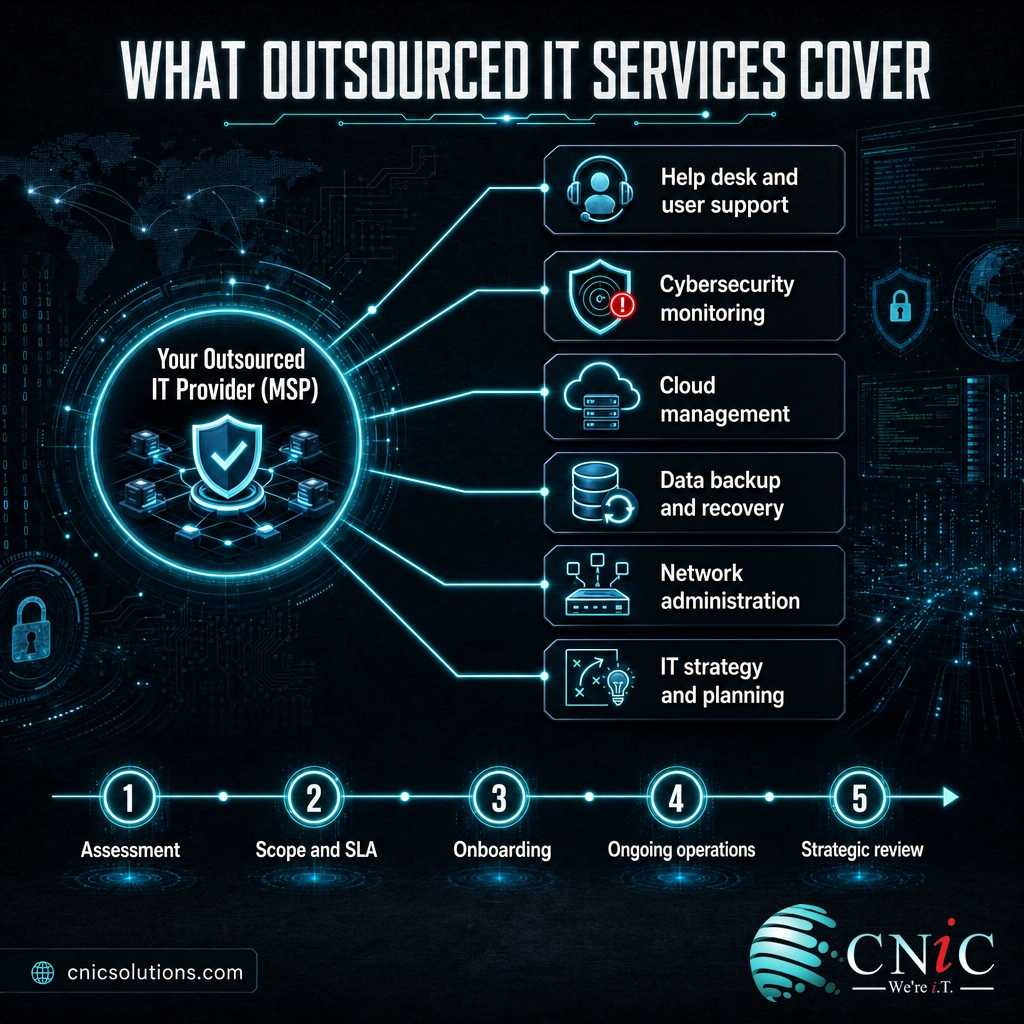
In practice, an outsourced IT relationship usually takes shape in a few clear steps:
- Assessment. The provider reviews your current setup, hardware, software, security posture, and pain points to understand what they would be taking on.
- Scope and agreement. You decide together what the provider owns, from full IT management to a single function like security, and it is written into a service level agreement (SLA) with defined response times.
- Onboarding. The provider deploys monitoring and management tools across your systems, documents your environment, and stabilizes anything urgent.
- Ongoing operations. Day to day, they run the help desk, monitor for threats, apply updates, manage backups, and keep systems healthy, usually preventing problems before you notice them.
- Strategic review. A good provider meets with you regularly to plan ahead, budget for upgrades, and align technology with where the business is going.
The functions you can outsource cover nearly the entire IT stack: help desk and user support, cybersecurity monitoring, cloud management, data backup and recovery, network administration, and strategic planning. You can hand over all of it or just the pieces your team cannot cover. The most complete form of this arrangement is managed IT services, where the provider proactively runs everything for a flat monthly fee.
Source: U.S. Chamber of Commerce: How to Outsource IT Services
Outsourced IT vs In-House IT
The most common question is not what outsourced IT is, but how it stacks up against the alternative: hiring your own people. The two models solve the same problem from opposite directions. In-house IT means employees on your payroll who know your business intimately but are limited by their number and their individual skill sets. Outsourced IT means an external team with broad expertise and coverage, but who start out less familiar with your specific operation.
| Factor | Outsourced IT | In-House IT |
|---|---|---|
| Cost structure | Predictable monthly or per-user fee | Salaries, benefits, training, and tools |
| Breadth of expertise | A full team across many disciplines | Limited to what you can hire |
| Coverage | Often 24/7, including nights and holidays | Business hours, with gaps for leave |
| Scalability | Add or reduce scope as you grow | Hire or lay off staff |
| Business knowledge | Learned over time | Deep and immediate |
| Key-person risk | Spread across a team | High if one person leaves |
| Tools and licensing | Included, enterprise grade | Bought and maintained by you |
The cost line is where the comparison gets real. According to the U.S. Bureau of Labor Statistics, the median salary for a network and computer systems administrator was 96,800 dollars in May 2024, and that is base pay alone. Add benefits, payroll taxes, training, and tools, which BLS data on employer compensation costs put at close to a third on top of wages, and one mid-level hire easily exceeds 125,000 dollars a year. That single person still cannot cover nights and weekends or match the breadth of a full provider team. For a deeper build-versus-buy breakdown, see our in-house versus outsourced IT cost comparison.
Neither model is automatically better. A large enterprise with a mature IT department may keep most work in-house. A small or midsize business, where a single hire is a large and risky bet, usually gets more capability per dollar from outsourcing. Many businesses land in the middle with a co-managed arrangement that keeps internal staff and adds outside help for specific gaps.
Source: U.S. Bureau of Labor Statistics: Network and Computer Systems Administrators
The Real Benefits of Outsourcing IT
Cost savings is the benefit everyone leads with, but it is not the one that keeps businesses outsourcing year after year. In Deloitte’s 2024 Global Outsourcing Survey, access to specialized talent has overtaken cost reduction as the leading reason organizations outsource. The value is less about paying less and more about reaching capability you could not build alone. Here is what that looks like in practice.
Predictable, controllable budgeting
Instead of unpredictable repair bills and surprise emergencies, outsourced IT converts technology into a fixed line item. You know what next month costs, which makes planning and cash flow far easier. For a growing business, turning a volatile expense into a flat fee is often worth as much as the raw savings.
Access to specialists you cannot hire
This is the big one. The talent is not available to hire at small-business scale. The 2024 ISC2 Cybersecurity Workforce Study put the global cybersecurity workforce gap at an estimated 4.8 million people, with 90 percent of organizations reporting skills gaps on their teams. A provider spreads a bench of security, cloud, and networking specialists across many clients, so you rent the exact expertise you need without a full-time salary or the risk of that specialist leaving.
Coverage that does not sleep
Threats and outages do not keep business hours. A small internal team cannot monitor systems around the clock without burnout or overtime, but a provider covers nights, weekends, and holidays as a matter of course. That matters because downtime is brutally expensive: in an ITIC survey, 98 percent of organizations said a single hour of downtime would cost them more than 100,000 dollars, and a majority put it above 300,000 dollars per hour.
Stronger security and compliance
Security is the function businesses most often outsource first, and the numbers explain why. The average cost of a data breach reached 4.44 million dollars in IBM’s 2025 report, and IBM’s earlier research found that organizations with a severe security staffing shortage paid roughly 1.76 million dollars more per breach than well-staffed peers. A provider brings enterprise-grade cybersecurity monitoring and the frameworks that regulated industries require, such as HIPAA, PCI-DSS, and SOC 2, without you assembling that program in-house.
Freedom to focus on the business
Every hour your staff spends resetting passwords or fighting a printer is an hour not spent on customers or growth. Outsourcing removes that drag. It also brings strategic guidance: many arrangements include a Virtual CIO who aligns technology decisions with where the business is headed, a level of planning most small companies cannot staff for.
Source: ISC2 2024 Cybersecurity Workforce Study | IBM Cost of a Data Breach 2025 | Deloitte 2024 Global Outsourcing Survey
The Real Costs of Outsourced IT Services
The honest answer to what outsourced IT costs is that it depends on scope, but the ranges are well established and worth knowing before any sales call. The recurring price is the headline number, and there are a handful of one-time and situational costs to budget alongside it. Understanding both prevents the two most common mistakes: assuming outsourcing is a magic discount, and getting surprised by setup fees.
For fully managed IT, the prevailing U.S. market rate is roughly 100 to 250 dollars per user per month. Where you land in that band depends on how much security and compliance you need, whether you want 24/7 coverage, and how complex your environment is. Break-fix support, where you pay only when something breaks, is usually billed hourly, often around 150 dollars an hour, with no ongoing coverage between calls. Project work, like a cloud migration or an office move, is quoted per job. For a full breakdown of how providers price each model, see our guide on how much managed IT services cost.
Illustrative Annual Cost: One In-House Admin vs Outsourced IT for a 20-User Business
Illustrative planning estimate. In-house figure = BLS median admin salary plus benefits and overhead; outsourced figure = 20 users at roughly $150/user/month. One hire is a single skill set with no after-hours coverage; the outsourced fee buys a whole team. Sources: BLS; prevailing U.S. market rates.
That comparison is illustrative, not a promise, and the point is not that outsourcing is always cheaper. A single in-house administrator and an outsourced team are not the same purchase. The hire is one person with one skill set who works business hours; the outsourced fee buys a bench of specialists and around-the-clock coverage. Outsourcing usually wins on capability per dollar, but the value shows up in breadth and coverage, not only on the invoice. Beyond the recurring fee, budget for these situational costs.
| Cost to plan for | When it applies | What to expect |
|---|---|---|
| Onboarding and setup | First 30 to 90 days | A one-time fee to deploy tools and document your environment |
| Hardware and licenses | Ongoing or as needed | Often billed separately from the management fee |
| Project work | Migrations, moves, upgrades | Quoted per project, outside the monthly fee |
| Compliance tooling | Regulated industries | Added coverage for HIPAA, PCI-DSS, or SOC 2 needs |
| Added users or sites | As you grow | Per-user pricing scales up with headcount |
The macro backdrop explains why these budgets keep rising: Gartner projects worldwide IT spending will reach 6.37 trillion dollars in 2026, up 14.2 percent from the prior year. Technology is becoming more central and more expensive to run well, which is exactly what pushes businesses toward a provider who can deliver it at scale.
Source: Gartner Worldwide IT Spending Forecast, 2026 | U.S. Bureau of Labor Statistics
Types of Outsourced IT Services
Outsourcing is not a single product. There are several models, and the right one depends on whether you have internal staff, how much coverage you need, and how you prefer to pay. Choosing the wrong model is the most common way businesses end up unhappy with outsourcing, so it pays to know the options.
| Model | How it works | Best for |
|---|---|---|
| Fully managed IT | The provider runs everything proactively for a flat monthly fee | Businesses with little or no internal IT |
| Co-managed IT | Your internal team keeps core work; the provider fills specific gaps | Businesses with capable but stretched staff |
| Break-fix | You pay by the hour only when something breaks, with no ongoing coverage | Very small or low-risk environments |
| Project-based | The provider handles a defined one-time job, then the engagement ends | Migrations, moves, and upgrades |
| Staff augmentation | Outside specialists work alongside your team for a set period | Filling a temporary skill or capacity gap |
For most small and midsize businesses, the choice comes down to fully managed versus co-managed IT, and it hinges on whether you already have staff worth keeping. Our comparison of fully managed versus co-managed IT walks through that decision in detail. The older break-fix model still exists, but it leaves you exposed between calls, which is why most businesses have moved to proactive, ongoing coverage.
Is Outsourced IT Worth It?
For most businesses without a mature internal IT department, outsourcing delivers more capability, coverage, and security per dollar than they could build alone. But it is not a universal yes, and two myths cause the most disappointment.
Myth: outsourcing IT is only about cutting costs, so the cheapest provider is the best value. Both halves are wrong. Cost is no longer even the top reason businesses outsource; access to talent and coverage is, per Deloitte. And the cheapest provider often means slow response times, thin security, and gaps that surface at the worst moment. The real measure of value is what an outage or breach would cost you, weighed against a provider who prevents it. Chasing the lowest monthly fee is how businesses end up paying far more after something goes wrong.
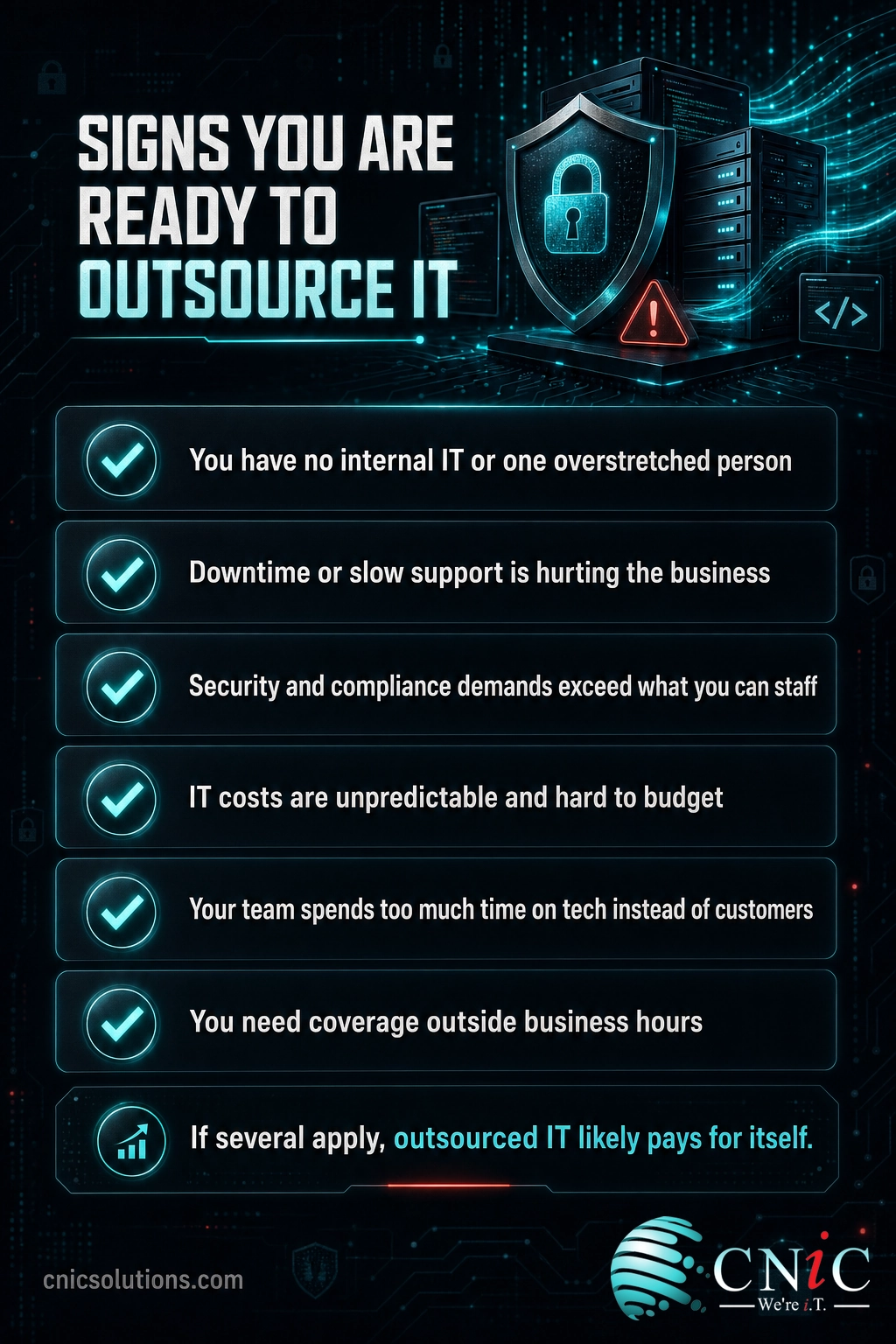
Outsourcing is the right call when you have no internal IT or a single overstretched person, when security and compliance demands exceed what you can staff for, or when you want predictable costs and coverage without building a department. It is less compelling when you already run a deep, well-resourced internal team, though even then a co-managed model often adds value. The honest test is simple: if running technology reliably and securely is pulling focus from your actual business, outsourcing is almost certainly worth it.
How to Get Started with Outsourced IT
Moving to outsourced IT does not require ripping everything out at once. The transition is usually methodical and low-risk when you follow a clear path:
- Define your goals and pain points. Write down what is failing today, whether it is downtime, security worry, slow support, or unpredictable costs. That list frames every provider conversation.
- Decide how much to outsource. Everything, or specific gaps like security and after-hours coverage. This determines whether you want a fully managed or co-managed arrangement.
- Vet providers on response and security, not just price. Ask about SLA response times, security tooling, compliance experience for your industry, and references from businesses like yours.
- Read the agreement carefully. Confirm what is included, what is billed separately, onboarding fees, and how you would exit if it is not working.
- Start and review. Begin with your highest-risk gap, confirm the arrangement works, and expand scope over time as trust builds.
The right provider will spend more time understanding your business than pitching features. If a conversation is all about their tools and none about your risks and goals, keep looking.
Get a free consultation on outsourcing your IT
Related Terms
- Managed IT Services: The most common form of outsourced IT, where a provider proactively runs your technology for a flat monthly fee.
- Managed Service Provider (MSP): The company that delivers outsourced or managed IT services and the tooling behind them.
- Co-Managed IT: A shared model where your internal team keeps core work and a provider fills specific gaps.
- Break-Fix IT: A reactive model where you pay only when something breaks, with no ongoing coverage.
- Virtual CIO (vCIO): A strategic technology advisor service that handles IT planning and budgeting without a full-time executive hire.
- Service Level Agreement (SLA): The contract that defines the response and resolution times a provider guarantees.
- IT Budgeting: The process of planning technology spend, including where outsourcing fits in the numbers.
Frequently Asked Questions
What are outsourced IT services?
How much do outsourced IT services cost?
Is outsourcing IT cheaper than hiring in-house?
What are the main benefits of outsourced IT?
What is the difference between outsourced IT and managed IT services?
Sources
The workforce and skills-gap figures come from the ISC2 2024 Cybersecurity Workforce Study. The breach-cost figure (4.44 million dollars) comes from IBM’s 2025 Cost of a Data Breach report, and the security-staffing premium (1.76 million dollars more per breach) from IBM’s 2024 report. The downtime-cost figures come from ITIC’s survey on the hourly cost of downtime. The in-house salary figure (96,800 dollars median) and the employer-benefits share come from the U.S. Bureau of Labor Statistics. The outsourcing-driver finding comes from Deloitte’s 2024 Global Outsourcing Survey. The IT-spend forecast comes from Gartner. Managed IT pricing figures (roughly 100 to 250 dollars per user per month; break-fix near 150 dollars per hour) are stated as prevailing U.S. market ranges for planning, not as a single-source statistic, and the illustrative cost chart combines the BLS salary figure with those market ranges.
Primary and authoritative sources: ISC2 2024 Cybersecurity Workforce Study, IBM Cost of a Data Breach, U.S. Bureau of Labor Statistics, Deloitte 2024 Global Outsourcing Survey, and Gartner Worldwide IT Spending Forecast.



related posts
RTO vs. RPO: Understanding the Two Key Disaster Recovery Metrics
September 24, 2026Short answer: RTO (Recovery Time Objective) is how long you can be down, measured forward from…
Security Awareness Training for Employees: A Complete Guide
September 24, 2026Security awareness training for employees is a continuous program that teaches your staff to recognize and…
Patch Management Best Practices for Businesses: 10 Steps That Actually Reduce Risk
September 23, 2026Patch management is the disciplined process of finding, testing, and deploying software updates so known vulnerabilities…
Remote Work IT Setup: A Complete Guide for Small Businesses
September 23, 2026Setting up IT for a remote or hybrid team is no longer a temporary arrangement, it…