

A virtual machine (VM) is a software-based computer that runs on top of a physical one, with its own operating system, memory, and storage carved out of the host’s real hardware. A hypervisor keeps each VM isolated, so one physical server can safely run many independent machines at once.
The device on your desk, or the server in your closet, is one physical computer running one operating system. A virtual machine breaks that one-to-one rule. It lets a single piece of hardware pretend to be many separate computers, each with its own operating system, each walled off from the others. That single idea is what lets a business run a dozen servers on one box, test risky software without touching production, and move whole systems into the cloud. This guide explains what a VM actually is, how it works under the hood, how it differs from the containers it gets confused with, and why virtualization quietly became the foundation of modern IT.
- A VM is a computer made of software. It runs a full operating system and behaves like a real machine, but it lives inside a physical host and uses a slice of that host’s hardware.
- The hypervisor makes it possible. This software layer divides one server’s CPU, memory, storage, and network among many VMs and keeps each one isolated.
- VMs are not containers. A VM virtualizes hardware and runs its own operating system. A container shares the host’s kernel, so it is lighter but has a weaker isolation boundary, per NIST.
- Virtualization exists because hardware sits idle. The typical server runs at just 12% to 18% of capacity, so packing several VMs onto one host recovers wasted computing power.
- It changed the economics of IT. Server consolidation through virtualization is a major reason U.S. data-center energy use flattened even as demand kept climbing.
What’s in This Guide
How a Virtual Machine Works
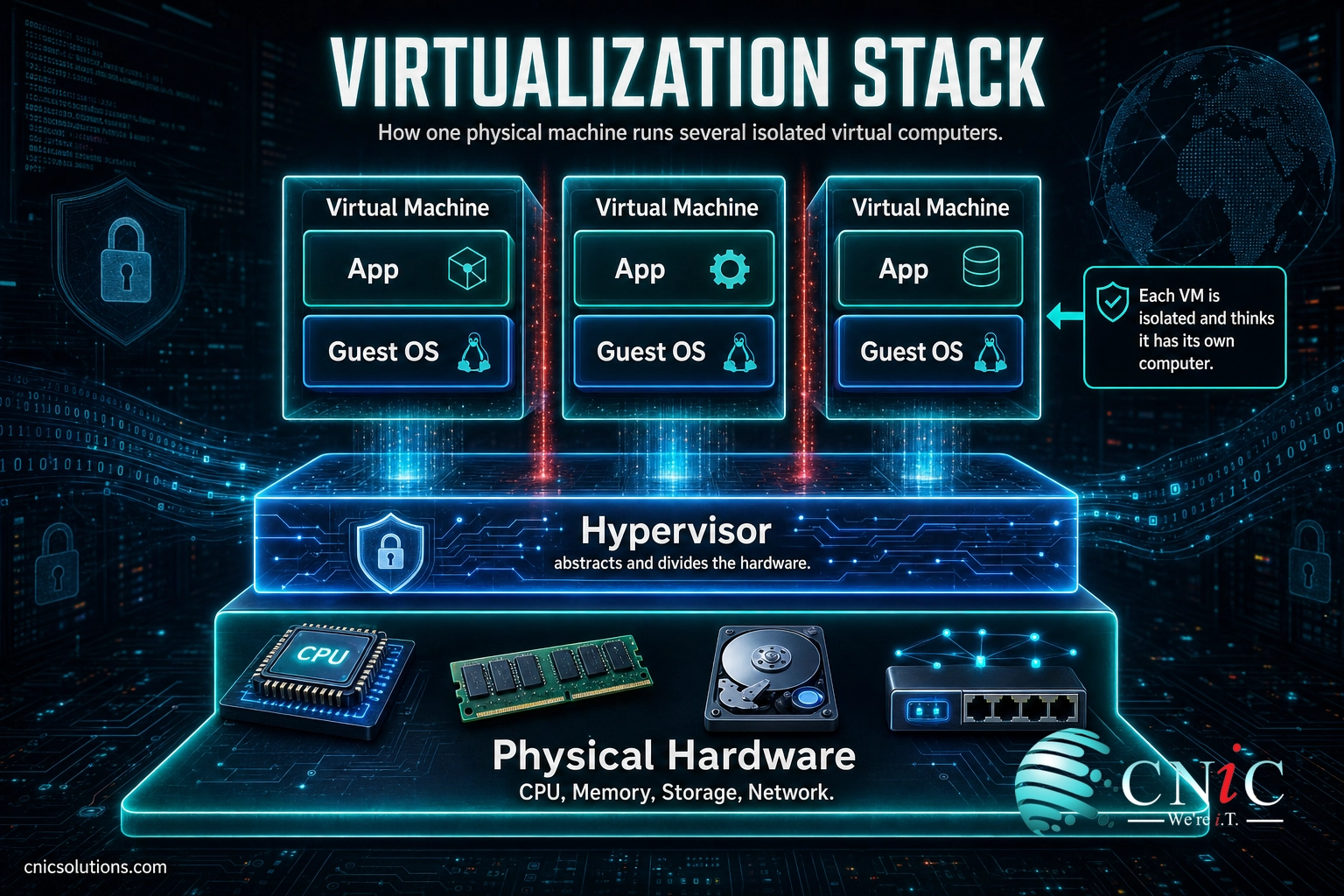
Start with a single physical computer: real CPU, real memory, real disks, a real network card. On its own, that machine can run one operating system at a time. Virtualization changes that by inserting a thin software layer, the hypervisor, between the hardware and the operating systems that use it.
The U.S. National Institute of Standards and Technology describes the hypervisor as software that provides an abstraction of all of a host’s physical resources, such as CPU, memory, network, and storage, and lets multiple computing stacks, each made up of an operating system and its applications, run on a single physical host as separate virtual machines. In plain terms, the hypervisor takes one server’s hardware, slices it up, and hands each slice to a VM that believes it has a whole computer to itself.
Here is what happens when a virtual machine runs:
- The hypervisor claims the hardware. It sits directly on the physical server (or on top of the host’s operating system) and takes control of the real CPU, memory, storage, and network.
- It creates virtual hardware. For each VM, the hypervisor presents a set of virtual devices, a virtual processor, a block of virtual memory, a virtual disk, and a virtual network adapter.
- A guest operating system boots inside the VM. Windows, Linux, or another OS installs onto that virtual hardware exactly as it would on a physical machine. It does not know the hardware is virtual.
- The hypervisor mediates every request. When a VM asks for processor time or reads a disk, the hypervisor schedules that request against the real hardware and keeps each VM’s activity separate from the others.
- Isolation is enforced. Because the hypervisor controls the boundaries, a crash, misconfiguration, or infection inside one VM stays inside that VM instead of spreading to the host or its neighbors.
A useful way to picture it: think of one physical server as an apartment building. Without virtualization, the whole building is a single-family home with one occupant using a fraction of the space. The hypervisor is the building manager who converts it into apartments. Each apartment (a VM) is self-contained, with its own lock, its own utilities, and its own tenant (a guest operating system), while the manager quietly makes sure everyone shares the plumbing and power fairly and no one can walk into a neighbor’s unit.
Because a VM is ultimately just files, data and configuration that describe a machine, it can be paused, copied, backed up, cloned, or moved to different hardware. That portability is one of the qualities that makes virtualization so practical, and it underpins a lot of what modern cloud computing for business is built on.
Source: NIST SP 800-125, Guide to Security for Full Virtualization Technologies
Virtual Machine vs Container: Clearing Up the Confusion
The single most common mix-up is between a virtual machine and a container. Both let you run isolated workloads on shared hardware, and people use the words almost interchangeably. They are not the same thing, and the difference matters when you decide what to run where.
A virtual machine virtualizes the hardware. Each VM carries a full guest operating system on top of the hypervisor. A container works one layer up: it shares the host’s operating system kernel and packages only an application and the libraries it needs. According to NIST’s application container guidance, containers share the same OS kernel and cannot run without a host OS present, and because they share that kernel, the degree of separation between them is weaker than the boundary a hypervisor gives to VMs.
| Attribute | Virtual Machine | Container |
|---|---|---|
| What it virtualizes | The hardware (CPU, memory, disk, network) | The operating system |
| Operating system | Runs its own full guest OS | Shares the host’s OS kernel |
| Size and startup | Larger (gigabytes), boots in seconds to minutes | Small (megabytes), starts in a moment |
| Isolation boundary | Strong, enforced by the hypervisor | Weaker, limited by a shared kernel |
| Best suited for | Running different operating systems, legacy apps, strong separation | Packaging and scaling many instances of the same app |
Neither is “better.” They solve different problems, and many organizations run containers inside VMs to get the density of containers with the isolation of a virtual machine. The point is to match the tool to the job rather than assume the newer word wins.
Myth: a virtual machine and a container are just two names for the same thing. They are not. A VM runs its own operating system on virtualized hardware and is isolated by the hypervisor. A container shares the host’s kernel and isolates only at the operating-system level. NIST is explicit that a container does not provide as clear or concrete a security boundary as a VM. Treating them as identical leads to putting sensitive or untrusted workloads in the wrong place.
Source: NIST SP 800-190, Application Container Security Guide
Why Virtual Machines Matter for Your Business
Virtualization is not an abstract engineering detail. It exists because of a very concrete, very expensive problem: most physical servers spend almost all of their life doing almost nothing.
A widely cited assessment of U.S. data centers by the Natural Resources Defense Council and Anthesis found that the typical server operates at no more than 12% to 18% of its capacity, and that this figure had barely moved for years. You buy a server, power it, cool it, maintain it, and it uses a small fraction of what you paid for.
It gets worse. The same research found that up to 30% of servers sitting in data centers are “comatose,” powered on and consuming energy while delivering no useful work at all. Every one of those machines is rent, power, and cooling spent on nothing.
A virtual machine is the fix for both problems. Instead of one underused server per application, you run many VMs on a single physical host, each isolated, together using far more of the hardware you already own. The chart below shows the gap virtualization closes on a single unconsolidated server.
Typical Server Capacity: Used vs Idle (NRDC / Anthesis)
On a typical unconsolidated server, roughly five out of every six units of capacity go unused. Virtualization packs multiple VMs onto that idle headroom. Source: NRDC / Anthesis, 2014.
The payoff scales up to the whole industry. Lawrence Berkeley National Laboratory’s United States Data Center Energy Usage Report credits the spread of virtualization and server consolidation as a primary reason U.S. data-center energy use stayed nearly flat for years even as computing demand kept rising. Doing the same work on fewer, better-used machines is the core benefit.
For a small or midsize business, that translates into fewer servers to buy and replace, lower power and cooling bills, faster recovery when hardware fails (you restore a VM file rather than rebuild a machine), and the flexibility to spin up a new server in minutes. Getting those benefits reliably is a question of how the underlying infrastructure is designed and managed, not just whether the software is switched on.
Source: NRDC / Anthesis, Data Center Efficiency Assessment (2014) | Lawrence Berkeley National Laboratory, United States Data Center Energy Usage Report

Types of Virtual Machines and Hypervisors
“Virtual machine” covers a couple of distinct ideas, and the hypervisors that run them come in two flavors. Knowing the categories helps you understand what a vendor or an IT provider means when they talk about virtualization.
System VMs vs Process VMs
A system virtual machine is what most people mean by “a VM.” It virtualizes an entire computer, so a full operating system and its applications run inside it. This is the kind of VM that powers servers, desktops, and cloud instances.
A process virtual machine is narrower. It exists only to run a single application in a controlled, hardware-independent environment. The Java Virtual Machine is the classic example: it lets the same Java program run on Windows, Linux, or macOS without change. Same word, very different scope.
Type 1 vs Type 2 Hypervisors
The hypervisor that creates system VMs comes in two forms, and NIST distinguishes them clearly:
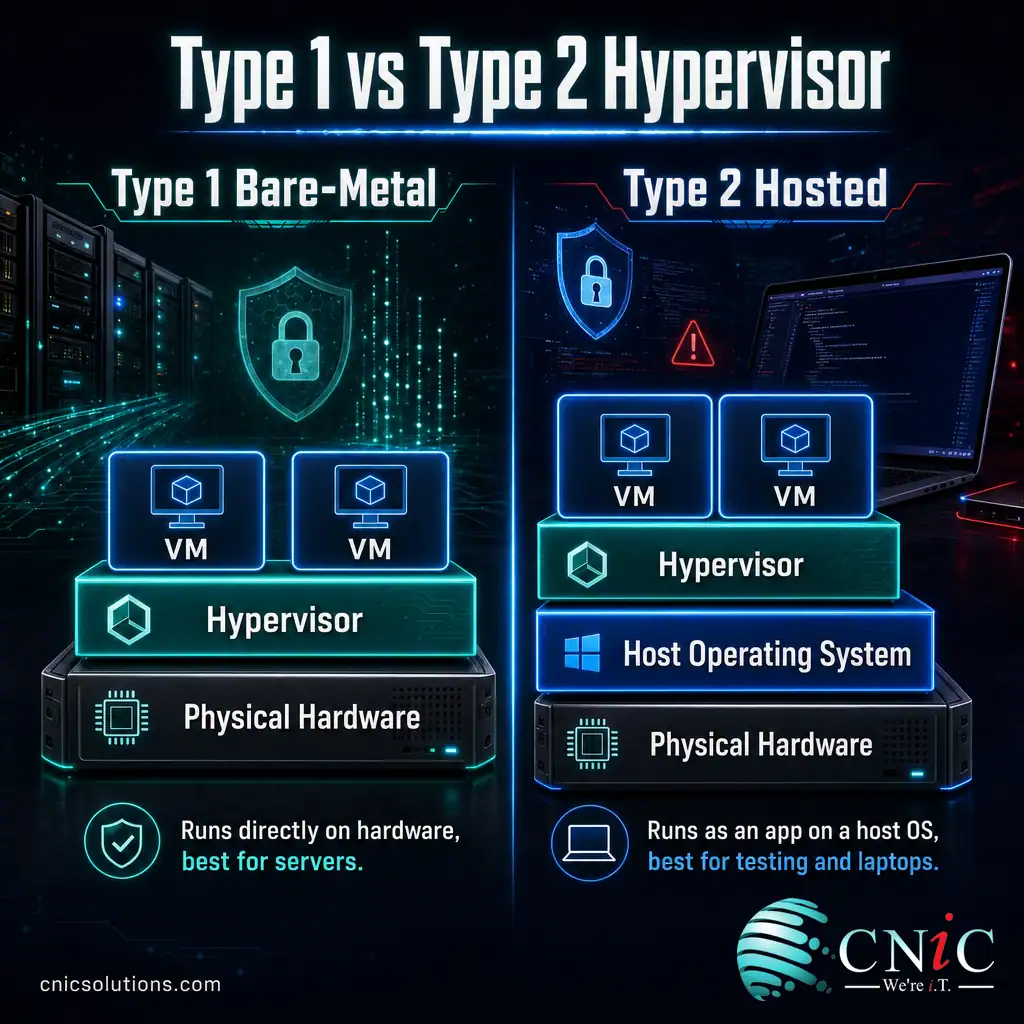
- Type 1 (bare-metal) hypervisor: runs directly on the physical hardware, with no host operating system underneath it. Because it sits closest to the hardware, it is the more efficient and secure choice for servers and data centers. Most business virtualization runs on Type 1 hypervisors.
- Type 2 (hosted) hypervisor: runs as an application on top of an existing operating system, the way you might install a program on your laptop. It is convenient for testing, development, and running a second OS on a personal machine, but it carries more overhead and a larger attack surface.
For a business consolidating servers, the practical answer is almost always a Type 1 hypervisor on dedicated hardware or in the cloud. Type 2 hypervisors earn their place on individual workstations, where convenience matters more than raw efficiency.
Source: NIST SP 800-125, Guide to Security for Full Virtualization Technologies
How to Get Started with Virtual Machines
Adopting virtualization is less about installing software and more about planning capacity, isolation, and recovery correctly. A typical path looks like this:
- Inventory what you run today. List the servers and applications you operate and how much CPU, memory, and storage each one really uses. This is where those idle-capacity numbers turn into a consolidation plan.
- Right-size the host. A virtualization host needs enough combined resources to run every VM you plan to place on it, plus headroom for spikes and failover. Undersizing is the most common early mistake.
- Choose where it lives. VMs can run on hardware you own, in the cloud, or a mix of both. The decision comes down to cost, control, and compliance, the same trade-off covered in cloud versus on-premise infrastructure.
- Plan backup and recovery. One of virtualization’s biggest advantages is that a VM is a file you can back up and restore. Build that into a real recovery plan rather than assuming it happens automatically.
- Monitor and maintain. Consolidation concentrates risk: if one host fails, several VMs go down together. Ongoing infrastructure performance monitoring and patching keep that risk in check.
Done well, virtualization lowers cost and raises resilience. Done carelessly, it concentrates several workloads onto one point of failure. That is why most small and midsize businesses run their virtual environments with help from a managed provider that handles design, capacity, and recovery as one system.
Get a Free Infrastructure Assessment
Explore Cloud and Virtualization Options
Common Questions About Virtual Machines
What is a virtual machine in simple terms?
What is the difference between a virtual machine and a container?
What is a hypervisor?
What are virtual machines used for?
Are virtual machines secure?
Related Terms
- Hypervisor: the software layer that creates virtual machines and divides one server’s hardware among them while keeping each VM isolated.
- Virtualization: the broad practice of turning physical computing resources into flexible, software-defined ones, of which virtual machines are the best-known example.
- Container: a lighter form of isolation that shares the host operating system kernel and packages a single application, rather than a whole machine.
- Guest operating system: the operating system installed inside a VM, which runs as if it had a physical computer to itself.
- IT infrastructure: the servers, storage, and networking a business runs on. See the primer on what a network infrastructure is.
- Cloud computing: renting virtualized servers and services from a provider instead of owning the hardware, built largely on VMs. See the complete guide to cloud computing for business.
- Colocation: housing your own servers in a third-party data center, an alternative to running virtualization hosts on site. See data center colocation explained.
- Hardware as a Service: leasing managed hardware, including virtualization hosts, instead of buying it outright. See Hardware as a Service explained.
About This Guide
Definitions of virtual machines, hypervisors, and the Type 1 versus Type 2 distinction follow the U.S. National Institute of Standards and Technology (NIST) guidance on full virtualization and application container security. Server-utilization and comatose-server figures are from the Natural Resources Defense Council and Anthesis Data Center Efficiency Assessment (2014). The observation that virtualization and consolidation flattened U.S. data-center energy growth is drawn from Lawrence Berkeley National Laboratory’s United States Data Center Energy Usage Report. Figures are cited to their original sources and used to illustrate the economics of virtualization, not as guaranteed outcomes for any specific business.
Sources: NIST SP 800-125, Guide to Security for Full Virtualization Technologies | NIST SP 800-190, Application Container Security Guide | NRDC / Anthesis, Data Center Efficiency Assessment (2014) | Lawrence Berkeley National Laboratory, United States Data Center Energy Usage Report
Get a Free Consultation on Your IT Infrastructure



related posts
What Is Shadow IT? Risks, Examples, and How to Manage It
October 29, 2026Shadow IT is any hardware, software, cloud service, or AI tool that employees use for work…
What Is SIEM? Security Information and Event Management Explained
October 29, 2026A SIEM (security information and event management) is a security platform that collects log and event…
What Is SASE (Secure Access Service Edge)? How It Works
October 28, 2026Secure access service edge (SASE) is a cloud-delivered model that combines wide-area networking (SD-WAN) with a…
What Is SD-WAN? How Software-Defined WAN Works
October 28, 2026SD-WAN (software-defined wide area network) is a way of building a business network that uses software…