

IT support tiers are a layered structure that routes each technical issue to the right level of expertise. Tier 1 handles common requests, Tier 2 takes on harder technical problems, and Tier 3 solves complex, system-level failures. The model controls cost and speeds resolution by matching the difficulty of a problem to the skill needed to fix it.
When you open a support ticket, it rarely lands on one all-knowing technician. It enters a tiered system built to send routine problems to fast, lower-cost agents and reserve expensive senior engineers for the issues that truly need them. Understanding how Level 1, 2, and 3 support work tells you exactly what you are paying for, why some fixes are instant and others take a callback, and how to judge whether your provider is structured to actually resolve problems.
- Five levels, three core tiers. Tier 0 (self-service) and Tier 4 (vendor) bookend the model, but Level 1, 2, and 3 are the human support structure that does the work.
- Cost climbs sharply with each escalation. MetricNet benchmarking puts a Level 1 ticket near $22, Level 2 near $62, and Level 3 near $85, with outside field and vendor support running into the hundreds.
- Most tickets should never leave Tier 1. The worldwide average first level resolution rate is about 74%, and every ticket solved at Level 1 avoids the cost of escalation.
- Escalation is about scope, not seniority. A ticket moves up when the current tier lacks the access, tools, or expertise, not because a higher tier is simply “better.”
- Structure is the buying signal. A support team with clean tiers, defined escalation, and documented handoffs resolves faster and cheaper than an undifferentiated pool of technicians.
What’s in This Guide
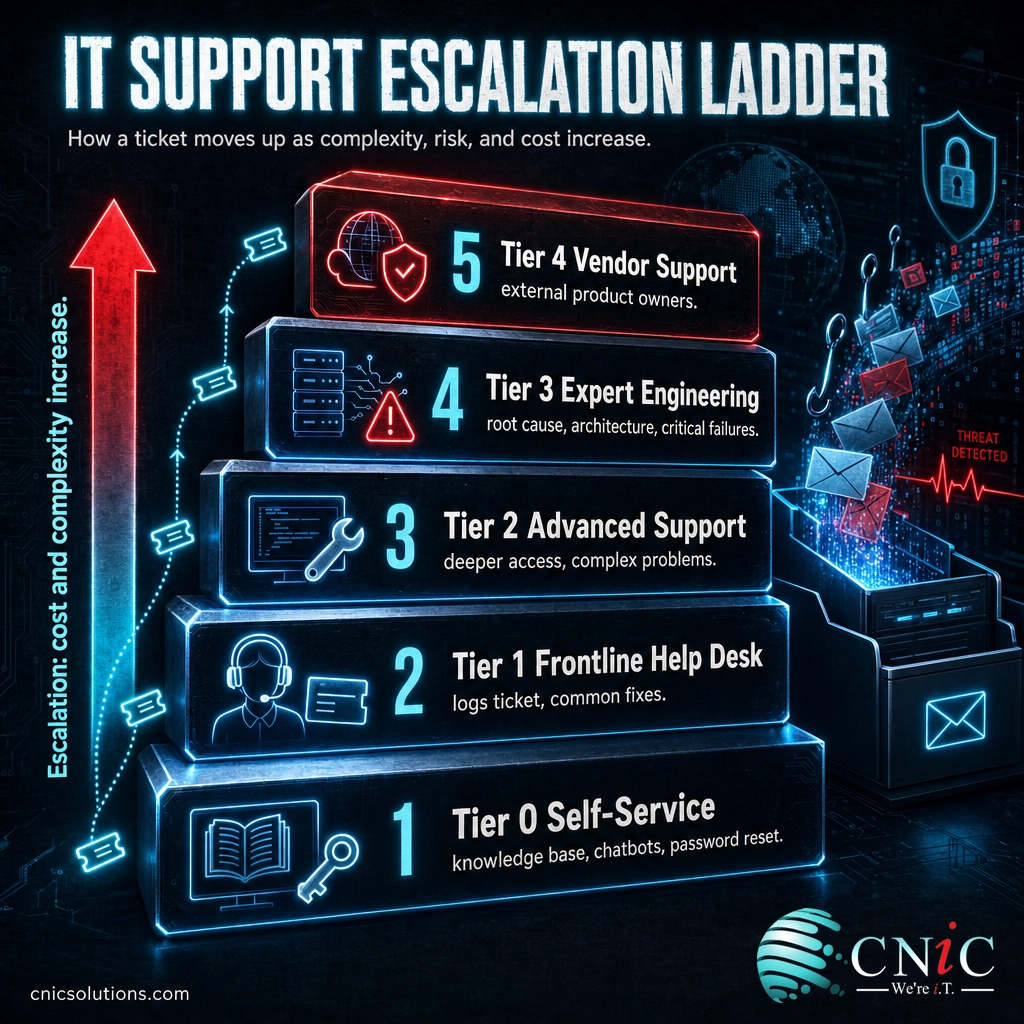
What Are IT Support Tiers?
IT support tiers are a way of organizing technical help by difficulty. Instead of every request reaching a senior engineer, issues are sorted so that a routine password reset and a failing database server are handled by very different people with very different skill sets. This tiered approach is the dominant operating model for help desks and is built into the ITIL service management framework, which formalizes the idea of moving a ticket to a team with greater expertise, a process it calls functional escalation.
The full model runs from Tier 0 to Tier 4, but the three middle levels do the human work of resolving issues:
- Tier 1 (frontline help desk): the first point of human contact. Logs the ticket, gathers details, and resolves common, documented problems.
- Tier 2 (advanced technical support): takes on issues that need deeper system access, configuration changes, and stronger product knowledge.
- Tier 3 (expert engineering): senior engineers, architects, and specialists who solve root causes, complex infrastructure, and critical failures.
Think of it like a hospital. The front desk and triage nurse handle intake and the routine cases (Tier 1). A specialist steps in when the problem needs focused expertise (Tier 2). And a surgeon is reserved for the situations only they can resolve (Tier 3). Sending every patient straight to surgery would be slow, expensive, and unnecessary. The same logic drives IT support tiers.
The point of the structure is not bureaucracy. It is to match each problem to the least expensive resource that can actually solve it, so simple issues resolve in minutes and expensive expertise is spent only where it is needed.
Source: ITIL Service Management (Axelos)
Tier 1 vs Tier 2 vs Tier 3: Side by Side
The single most common point of confusion is the difference between the three levels. People assume a higher tier means “better” or “faster” support. It does not. Each tier is defined by the type of problem it owns and the access and expertise required, not by how good the technician is. Here is how the three core levels compare.
| Attribute | Tier 1 (Frontline) | Tier 2 (Advanced) | Tier 3 (Expert) |
|---|---|---|---|
| Owns | Common, documented requests | Complex technical problems | Root cause, architecture, critical failures |
| Typical work | Password resets, account lockouts, basic troubleshooting, how-to questions | Network and application configuration, log analysis, integrations, deeper diagnostics | Code-level fixes, server and infrastructure failures, design changes, security engineering |
| Skill level | Generalist with a knowledge base | Experienced technician or administrator | Senior engineer, architect, or specialist |
| System access | Limited, standard tools | Elevated, deeper system access | Full, including production and infrastructure |
| Resolution speed | Fastest, often on first contact | Moderate, may need investigation | Slowest, reserved for the hardest cases |
Notice that Tier 1 is the fastest and Tier 3 is the slowest. That is by design. Tier 3 engineers are not sitting idle waiting for calls. They are the scarcest, most expensive resource, so their time is protected for problems that genuinely require it. A well-run help desk keeps as much volume as possible at Tier 1 and only escalates what it must.
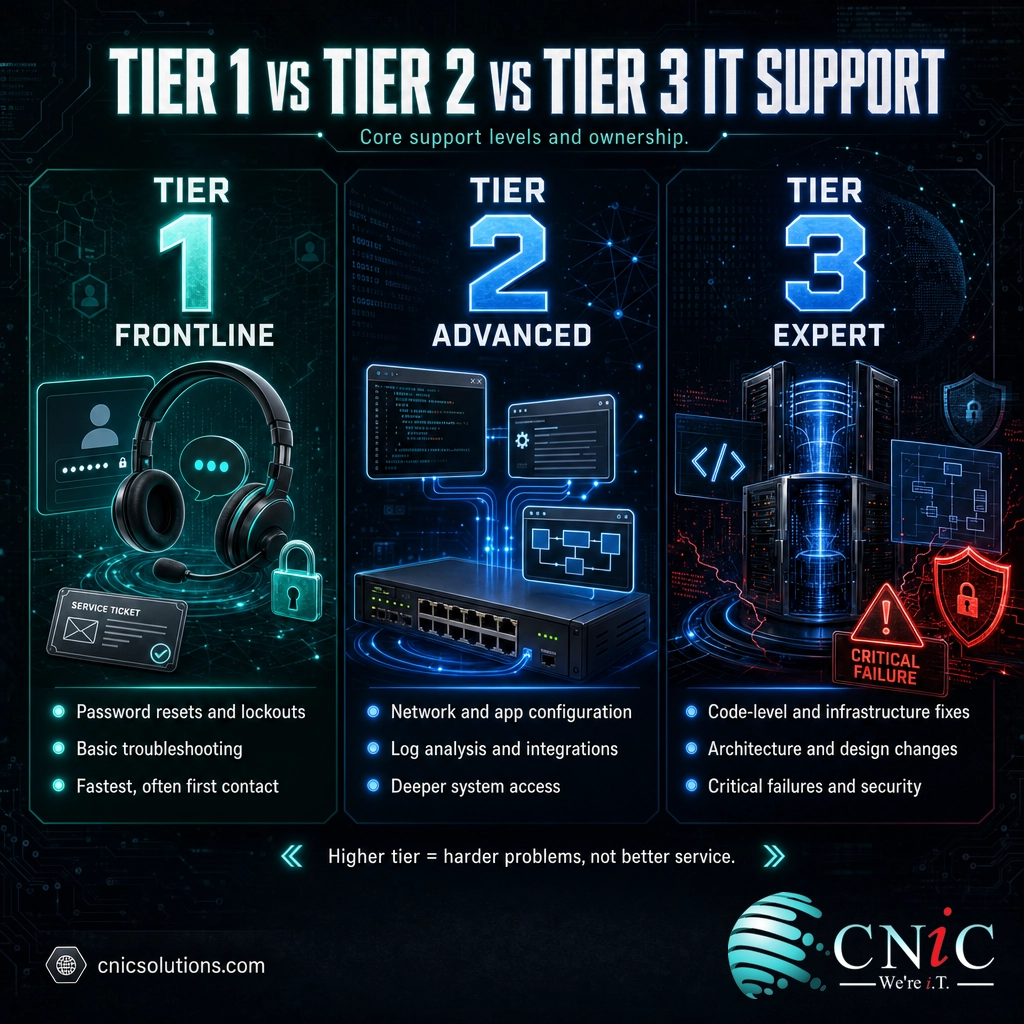
Myth: a higher tier means better, faster service. It is the opposite. Higher tiers are slower and more expensive precisely because they are reserved for harder problems. If your issue jumps to Tier 3, it usually means the problem is serious, not that you are getting VIP treatment. A healthy support operation resolves most tickets at Tier 1 and treats a Tier 3 escalation as an exception, not the goal.
Why IT Support Tiers Matter for Your Business
Tiers are not an internal detail you can ignore. They directly shape how fast your team gets unblocked and how much your support actually costs. Two numbers explain why.
First, the cost of a ticket rises steeply every time it escalates. MetricNet, a widely referenced source of service desk and desktop support benchmarks, puts the fully burdened cost of resolution at each level as follows.
Average Cost per Ticket by Support Level (North America, MetricNet)
Fully burdened cost per ticket. A vendor-support ticket costs roughly 21 times a Level 1 ticket. Source: MetricNet.
These costs are also cumulative. When a ticket is logged at Level 1 and then escalated to Level 2, MetricNet notes the cost is not just the Level 2 figure but the two combined, because the frontline handling still happened. Every unnecessary escalation stacks cost on top of cost.
Second, most tickets can and should be resolved at Tier 1. MetricNet’s benchmarking database shows the average net first level resolution rate for service desks worldwide is about 74%, ranging from a low near 38% to a high near 98%. The best-performing desks resolve more than 90% of eligible contacts at Level 1 by equipping frontline agents with strong knowledge management and remote diagnostic tools.
There is an important distinction here. First level resolution (solving the ticket at Tier 1, even if it takes a callback) is a cost metric. First contact resolution (solving it on the very first interaction) is a quality metric that drives satisfaction. For desktop support, MetricNet reports an average first contact resolution rate near 84%. Both matter, and both improve when the tier structure is clear and frontline agents are properly enabled.
Put together, these numbers make the business case plain: a support operation that resolves the majority of issues at Tier 1 is both faster for your team and dramatically cheaper to run than one that reflexively escalates. When you evaluate managed IT services, the tier structure and first level resolution rate are two of the most revealing questions you can ask.
Source: MetricNet via HDI, First Level Resolution Rate benchmarking | MetricNet, Desktop Support First Contact Resolution
Tier 0 and Tier 4: Self-Service and Vendor Support
Level 1, 2, and 3 are the core, but the model has two bookends that shape the whole system.
0Tier 0: Self-Service
Tier 0 is support with no human involved. Knowledge base articles, FAQs, automated password reset tools, and chatbots let users solve common problems on their own. The economics are compelling. Gartner found that live service channels cost an average of $8.01 per contact while self-service channels cost about $0.10, and that roughly 70% of customers already start with self-service.
The catch is that self-service has real limits. In the same Gartner research, only 9% of customers said they resolved their issue completely through self-service without needing a person. Tier 0 is a powerful way to deflect simple, repetitive requests, but it does not replace a staffed help desk. It works best as the first filter that keeps easy questions from ever becoming tickets.
Source: Gartner customer service and support research
4Tier 4: External Vendor Support
Tier 4 is not part of your support team at all. It is the outside vendors and manufacturers responsible for a specific product, such as a software publisher, a hardware maker, or a cloud platform. When an issue is a genuine defect in a third-party product, it has to go to the party that controls the code or the hardware. As the cost chart above shows, vendor support is the most expensive path to resolution, which is another reason a strong internal team resolves everything it can before handing off.
How Escalation Actually Works
Escalation is the mechanism that moves a ticket up a tier. It is not a failure. It is the system working as intended when a problem exceeds the current level’s scope. What separates good escalation from bad is discipline about when and how it happens.
A ticket should escalate for one of three reasons:
- Access. The current tier does not have the permissions or system rights to make the fix.
- Expertise. The problem requires knowledge or tooling the current tier does not have.
- Time. The ticket has passed a defined threshold without resolution and needs a higher level of attention.
The quality of an escalation depends on the handoff. When Tier 1 escalates cleanly, it passes along everything already tried, the exact symptoms, and the relevant logs, so Tier 2 does not restart the diagnosis from zero. Poor handoffs are where support goes wrong: the customer repeats the whole story, the higher tier redoes work already done, and cost and frustration both climb. This is why documented tickets and a shared knowledge base matter as much as technical skill.
Well-run support also feeds solutions back down the ladder. When Tier 3 solves a novel problem, the fix should be documented so that the next time it appears, Tier 1 can resolve it. Over time this raises the first level resolution rate and pushes more volume to the cheapest, fastest tier.
In-House Tiers vs a Managed IT Provider
Building all three tiers in-house is expensive. It means hiring frontline help desk staff, experienced technicians, and at least one senior engineer, plus covering vacations, turnover, and after-hours coverage. For most small and midsize businesses, staffing a true Tier 3 engineer full time is hard to justify, because those problems are rare but the salary is not.
This is the core reason businesses turn to a co-managed or fully outsourced support model. A managed IT provider supplies all three tiers as a single team. You get a frontline help desk for daily issues, advanced technicians for the harder problems, and expert engineers on call for the critical ones, without paying to keep each level on your own payroll. The provider spreads the cost of that senior expertise across many clients, so you get access to it at a fraction of the price of hiring it.
The move from a reactive, one-technician setup to a structured tiered team is also the practical difference between old-school break-fix IT and modern managed services. When you compare providers, ask how their tiers are structured, what their first level resolution rate is, and how they document escalations. Those answers tell you whether you are buying an organized support system or just a phone number.
Compare Managed IT Pricing Models
What a Managed Security Provider Adds
Common Questions About IT Support Tiers
What are the levels of IT support?
What is the difference between Tier 1, Tier 2, and Tier 3 support?
What does Tier 1 IT support do?
When should a ticket be escalated to a higher support tier?
Do small businesses need all three IT support tiers?
Related Terms
- Managed IT services: outsourcing your full IT support and management, including all three tiers, to a single provider that supplies frontline, advanced, and expert engineering as one team.
- Fully managed vs co-managed IT: the choice between handing a provider your entire IT function or having their tiers supplement your internal staff. See how to choose the model that fits your business.
- Co-managed IT: a model where a provider’s tiers reinforce your in-house IT team rather than replacing them.
- Break-fix IT: the reactive, pay-per-incident model that predates structured tiered support.
- MSSP: a managed security service provider that delivers tiered support focused specifically on cybersecurity.
- First level resolution (FLR): the share of tickets resolved at Tier 1 without escalation, a key cost and efficiency metric.
- First contact resolution (FCR): the share of tickets solved on the very first interaction, a key satisfaction metric.
- Functional escalation: the ITIL term for moving a ticket to a team with greater expertise.
- Quarterly business review (QBR): the recurring strategy check-in where you review support performance with your provider. Learn about the QBR process.
About This Guide
Cost per ticket and first level resolution benchmarks are drawn from MetricNet, a benchmarking firm specializing in service desk and desktop support metrics, as published through HDI. Self-service and live-channel cost figures are from Gartner customer service and support research. The tier and escalation framework follows ITIL service management practice. Figures are cited to their original sources and used to illustrate the structure and economics of tiered support, not as guaranteed outcomes for any specific business.
Sources: MetricNet / HDI, First Level Resolution Rate | MetricNet, Desktop Support First Contact Resolution | Gartner, self-service research | ITIL Service Management (Axelos)
Get a Free Consultation on Your IT Support



related posts
Zero Trust Statistics for 2026: Adoption, Maturity, and Breach Impact
November 3, 2026Zero trust has become the default security strategy on paper, but not yet in practice. Okta's…
What Is ZTNA (Zero Trust Network Access)?
November 3, 2026Zero Trust Network Access (ZTNA) is a security service that grants a verified user access to…
What Is XDR (Extended Detection and Response) and How Does It Protect…
November 2, 2026Extended detection and response (XDR) is a security platform that collects and correlates threat data from…
What Is Zero Trust Security? A Guide for Small Businesses
November 2, 2026Zero Trust security is a cybersecurity model built on one rule: never trust, always verify. Instead…