

A VPN (virtual private network) is a service that creates an encrypted connection between a device and a private network across the public internet. It hides the device’s IP address and scrambles data as it travels, so information stays private even over untrusted connections. For businesses, a VPN is how remote staff and branch offices reach company systems safely.
Your team works from home offices, client sites, hotels, and coffee shops, and every one of those connections carries company data across networks you do not control. A virtual private network, or VPN, is the tool that wraps that traffic in encryption and gives remote workers a secure path back to your systems. This guide explains what a VPN actually is, how it works in plain English, how it differs from a proxy server (the comparison that confuses the most people), the two types businesses rely on, why it matters for your bottom line, and the honest limits of a VPN in a modern security stack.
Key Takeaways
- A VPN does two jobs: it encrypts your data in transit and it hides your device’s real IP address behind the VPN server.
- It works by building a tunnel. Your traffic travels inside an encrypted tunnel to a VPN server, so no one on the local network can read it.
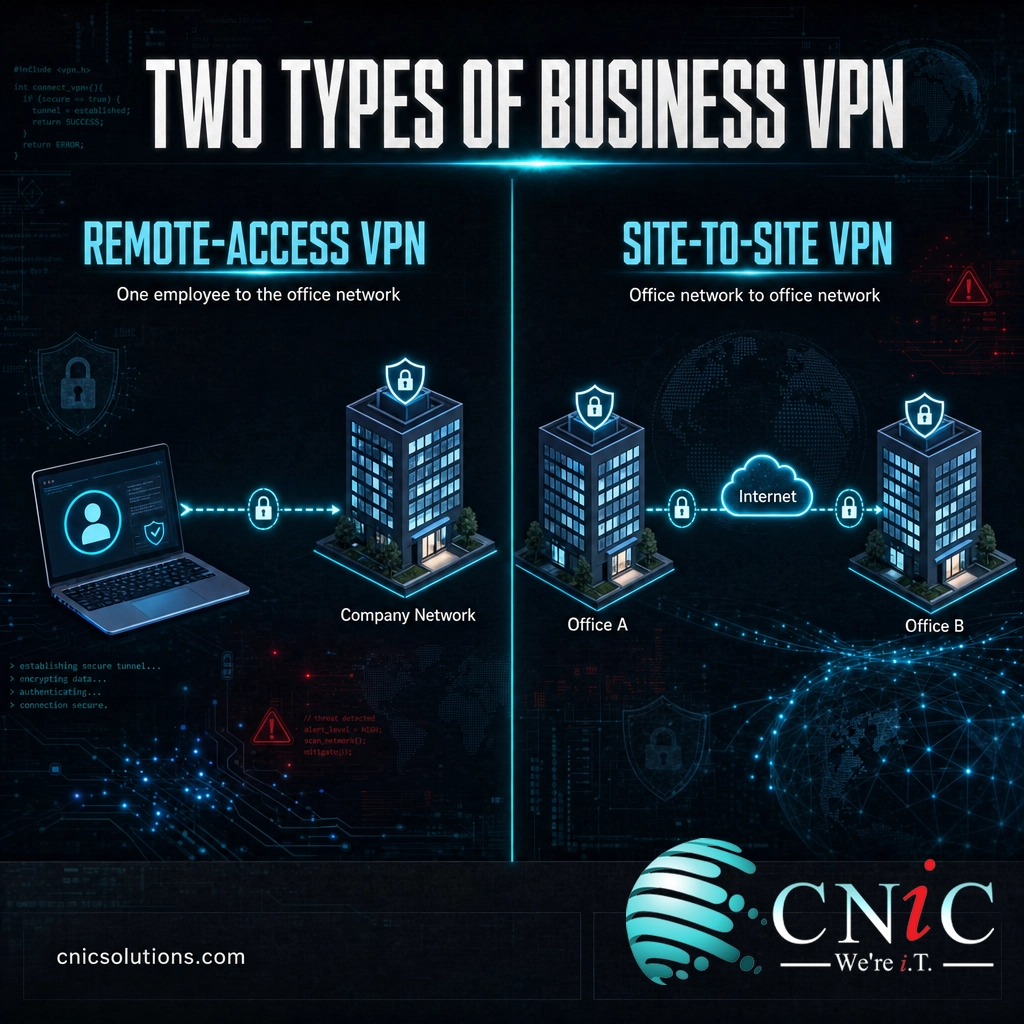
- Businesses use two types: remote-access VPNs (one employee to the office) and site-to-site VPNs (office to office).
- A VPN is not a proxy. A proxy reroutes one app and rarely encrypts; a VPN encrypts everything on the device.
- A VPN is one layer, not a whole defense. It has to be patched, backed by multi-factor authentication, and increasingly paired with zero-trust access.
What’s in This Guide
What a VPN Is
VPN stands for virtual private network. It is a service that extends a private network across a public one, so a device can send and receive data as if it were sitting directly on that private network, even when it is physically somewhere else. The connection is virtual because it runs over the shared public internet rather than a dedicated cable, and private because encryption keeps the contents hidden from everyone in between.
The U.S. National Institute of Standards and Technology describes a VPN as a protected information system link using tunneling, security controls, and endpoint address translation to give the impression of a dedicated line. In plain terms: it makes an ordinary internet connection behave like a private, direct line between your device and the network you are reaching.
A VPN does two things at once. First, it encrypts the data leaving your device, so anyone who intercepts it (on shared Wi-Fi, for example) sees only scrambled noise. Second, it masks your IP address, because your traffic exits from the VPN server rather than your device, so the sites and services you reach see the server’s address, not yours. Encryption protects the content; address masking protects the source.
How a VPN Works
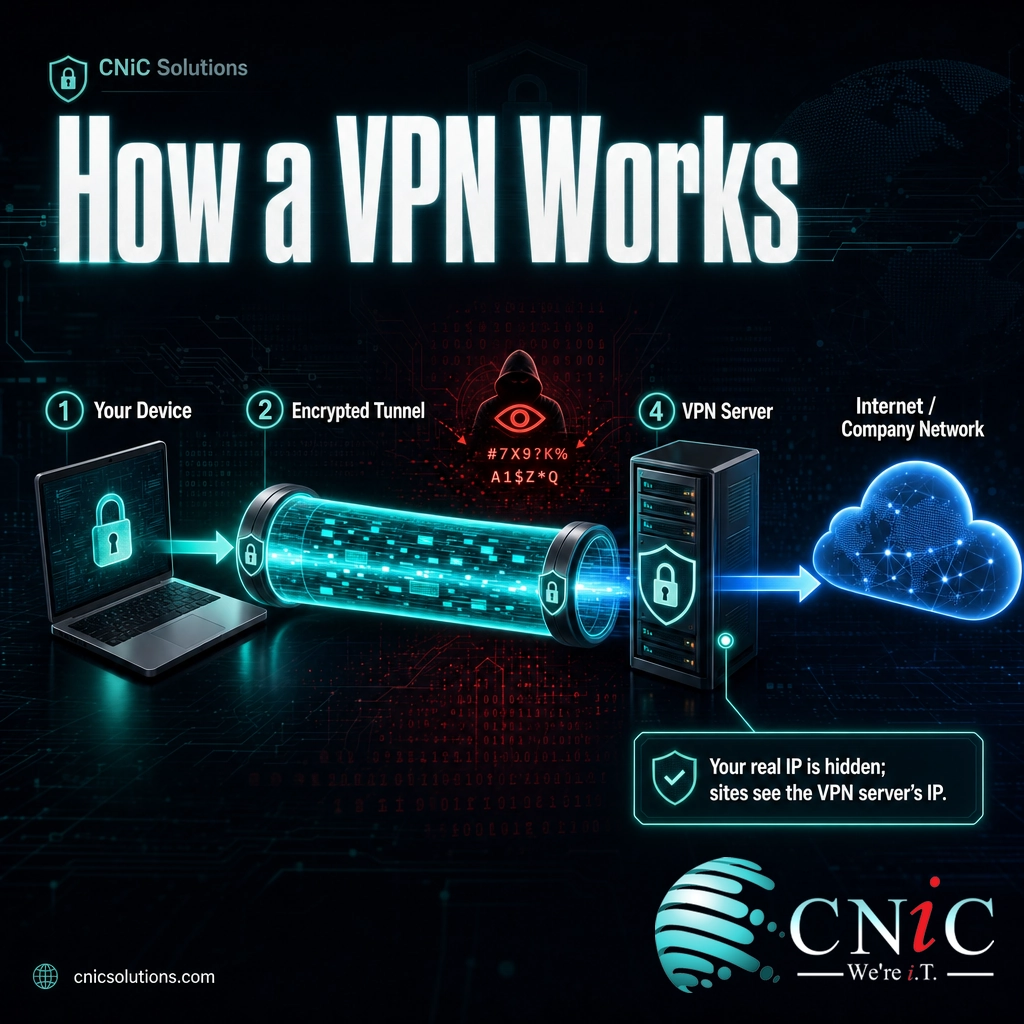
Think of the public internet as a busy highway that anyone can watch. A VPN builds a sealed, armored tunnel along that highway. Your data still travels the same road as everyone else’s, but no one outside can see what is inside the tunnel or where it originally came from. Here is what happens, step by step, when an employee connects:
- 1. The VPN client starts the connection. Software on the laptop or phone (the VPN client) reaches out to a VPN server and the two authenticate each other, confirming the user and device are allowed in.
- 2. An encrypted tunnel is established. The client and server agree on encryption keys and open a secure tunnel between them using a VPN protocol (such as IPsec, OpenVPN, or WireGuard).
- 3. Traffic is encrypted and sent. Everything the device sends is encrypted before it leaves and travels inside the tunnel. To the local network or internet provider, it is unreadable.
- 4. The VPN server decrypts and forwards. At the other end, the server decrypts the traffic and passes it on to the company network or the wider internet, using its own IP address.
- 5. Responses come back the same way. Replies return to the VPN server, get encrypted, and travel back through the tunnel to the device, where the client decrypts them.
The result is that anyone positioned between the device and the VPN server, an eavesdropper on public Wi-Fi, the internet provider, or an attacker on the same network, cannot read the data or trace it back to the original device. This is exactly why VPNs became the default way to connect a scattered workforce back to the office.
VPN vs. Proxy Server: Clearing Up the Confusion
The term most often confused with VPN is proxy server. Both change the IP address that websites see, so people assume they are interchangeable. They are not, and the difference matters when you are protecting a business.
A proxy server acts as a middleman for a single application, usually a web browser. It forwards that app’s requests under its own address, which is useful for things like content filtering or caching. But a standard proxy typically does not encrypt your traffic, and it only covers the one app configured to use it. A VPN operates at the level of the whole device: it encrypts and routes everything the device sends, across every app, through the secure tunnel.
| Proxy Server | VPN | |
|---|---|---|
| What it covers | One app (usually the browser) | The entire device, all apps |
| Encryption | Usually none | Yes, all traffic in the tunnel |
| Hides IP address | Yes | Yes |
| Main business use | Filtering, caching, access control | Secure remote access to the network |
| Protects data on public Wi-Fi | No | Yes |
The simplest way to hold the distinction: a proxy changes where your traffic appears to come from; a VPN changes that and protects what the traffic contains. For a business moving sensitive data across untrusted networks, that encryption difference is the whole point.
The Two Types of VPN for Business
Consumer VPN ads focus on privacy and streaming, but business VPNs come in two distinct forms, and knowing which is which helps you understand what your own network needs.
Remote-Access VPN
A remote-access VPN connects an individual device to the company network from wherever that person happens to be. The employee opens the VPN client, authenticates, and their laptop behaves as if it were plugged in at the office, with access to shared drives, internal applications, and systems that are not exposed to the open internet. This is the type most people mean when they say “log in to the VPN,” and it is the backbone of secure remote and hybrid work.
Site-to-Site VPN
A site-to-site VPN links two entire networks together, for example a headquarters and a branch office, so they operate as one extended network over the internet. Instead of each employee running a client, the connection is handled by the firewalls or routers at each location. Staff at either site reach shared resources directly, without each person connecting. It is a cost-effective alternative to leasing a dedicated private line between offices.
You will also hear about the underlying protocols that carry these connections, such as IPsec and SSL/TLS. Those determine how the tunnel is built and secured, but the two categories above (person-to-network and network-to-network) are the ones that map to real business decisions. Both fit inside a broader network infrastructure and connectivity strategy.
Why a VPN Matters for Your Business
The value of a VPN is easiest to see against the backdrop of the threat environment. Business data now moves constantly across networks the company does not own, and the cost of that data falling into the wrong hands keeps climbing.
A VPN does not stop every one of those crimes, no single control does, but it closes a specific and common gap: data exposed while it is moving. When an employee checks email or opens a file over hotel or airport Wi-Fi, that traffic can be intercepted by anyone on the same network. A VPN encrypts it, so an intercepted session yields nothing usable. That protection matters most for the industries CNiC serves, where a single exposed record carries regulatory weight, such as healthcare data under HIPAA, cardholder data under PCI-DSS, or client files in legal and financial services.
Just as important, a VPN controls access. Internal systems can stay off the public internet entirely, reachable only through the VPN after a user authenticates. That shrinks the attack surface: a system attackers cannot see is far harder to attack.
Source: FBI IC3, 2024 Internet Crime Report | FBI: Annual Internet Crime Report announcement
The Limits of a VPN and the Shift to Zero Trust
A VPN is valuable, but it is not a force field, and treating it as one is a common and dangerous mistake.
Myth: “We have a VPN, so our remote access is secure.” A VPN encrypts traffic and gates access, but it does not verify that the device connecting is healthy, and it traditionally grants broad access to the network once a user is in. If an attacker steals valid credentials, the VPN will happily encrypt their traffic too and let them roam. The VPN itself is also a target: unpatched VPN appliances are a favorite entry point for attackers.
Federal cybersecurity authorities have flagged these risks directly. In its guidance on enterprise VPN security, the Cybersecurity and Infrastructure Security Agency (CISA) warned that because VPNs run around the clock, organizations often fall behind on patching them, and that remote access without multi-factor authentication is far more vulnerable to phishing. The NSA and CISA later published joint guidance on selecting and hardening remote-access VPNs, precisely because these devices are so heavily targeted.
This is why many organizations are moving toward a zero-trust model, often delivered as Zero Trust Network Access (ZTNA). Instead of trusting anyone who gets through the VPN and giving them the run of the network, zero trust verifies every user and device for every request and grants access only to the specific application they need. CISA’s Zero Trust Maturity Model lays out that shift from “network location equals trust” to “never trust, always verify.” A VPN is not obsolete, but it increasingly works alongside, or is replaced by, these more granular controls.
Source: CISA: Enterprise VPN Security | CISA: Zero Trust Maturity Model
How to Use VPNs Safely in Your Business
If your business relies on a VPN, or is deciding whether to, a handful of practices separate real protection from a false sense of security:
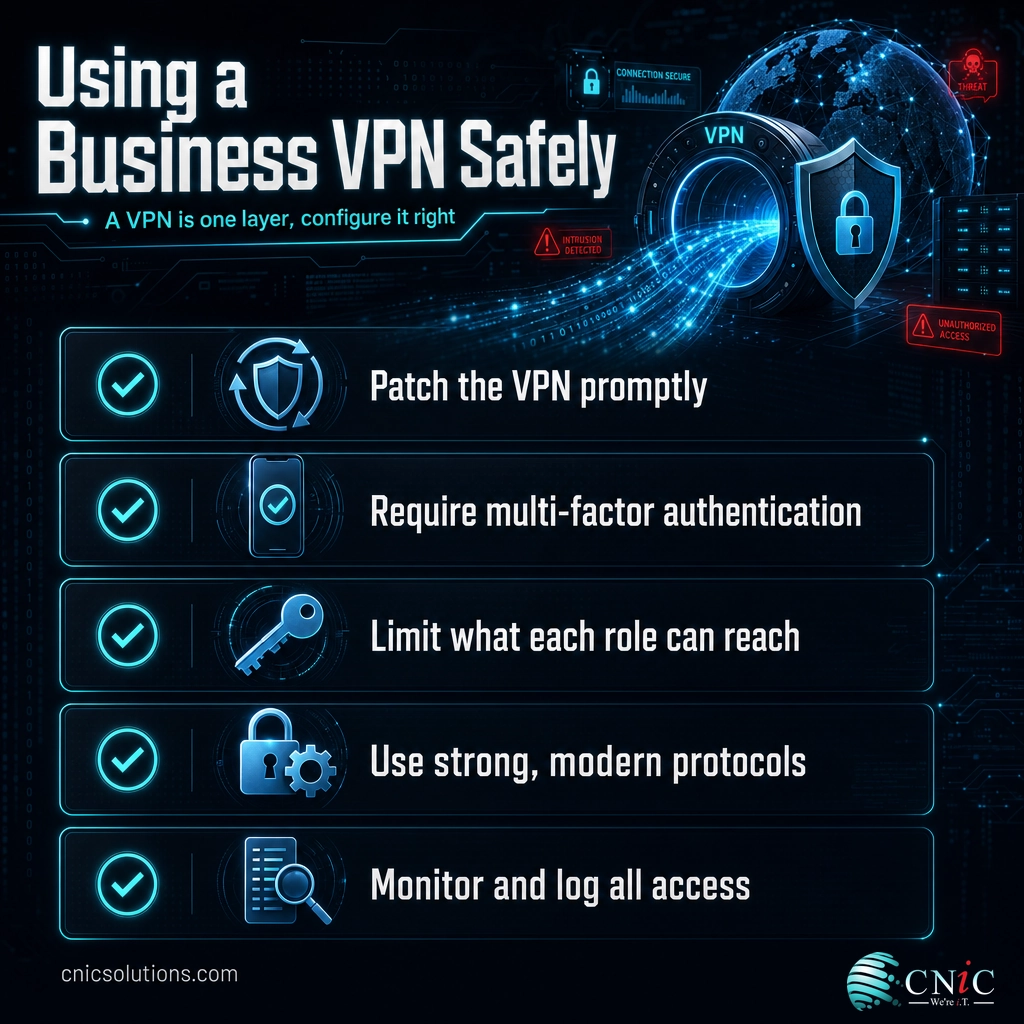
- Patch the VPN itself, promptly. VPN appliances and clients need updates like anything else, and because they face the internet, an unpatched one is an open door.
- Require multi-factor authentication. Credentials get stolen; a second factor stops a stolen password from becoming a network breach.
- Limit what the VPN unlocks. Give each role access only to the systems it needs, rather than the entire network, so a single compromised account cannot reach everything.
- Use strong, current encryption and protocols. Modern protocols such as IPsec, OpenVPN, and WireGuard, configured correctly, keep the tunnel genuinely private.
- Monitor and log access. Know who is connecting, from where, and when, so unusual activity gets caught early.
Getting this right is less about buying a product and more about designing, configuring, and maintaining remote access as part of a coherent security program. That is the work CNiC Solutions does for small and midsize businesses: setting up and managing secure remote access through our networking services, hardening it as part of layered cybersecurity protection, and helping leadership decide where a VPN fits (and where zero trust should take over) through Virtual CIO planning. If network security is on your list, a wider look at why network security matters and a managed firewall are natural companions to a VPN.
Get a free security assessment of your remote access from CNiC
Frequently Asked Questions
What is a VPN?
How does a VPN work?
What is the difference between a VPN and a proxy server?
What types of VPN do businesses use?
Is a VPN enough to keep my business secure?
Related Terms
- Proxy server: A middleman that reroutes a single app’s traffic under its own IP address, usually without encrypting it.
- VLAN: A virtual LAN that segments one physical network into separate logical networks for security and organization.
- Subnet: A subdivision of an IP network that groups devices and controls how traffic is routed between them.
- LAN vs. WAN: Local versus wide area networks, the difference between one office’s network and networks spread across locations.
- Managed firewall: A monitored barrier that filters traffic entering and leaving the network, often the device that terminates a site-to-site VPN.
- Zero Trust Network Access (ZTNA): A model that verifies every user and device for each request and grants access only to specific applications, rather than the whole network.
- Cybersecurity basics: The foundational controls, including encryption and MFA, that a VPN complements rather than replaces.
About This Guide and Sources
The definitions and framework in this guide, what a VPN is, how the encrypted tunnel works, the distinction from a proxy server, the remote-access and site-to-site models, and the underlying protocols (IPsec, SSL/TLS, OpenVPN, WireGuard), reflect standard, widely consistent characterizations of virtual private networks, anchored to the U.S. National Institute of Standards and Technology (NIST) glossary definition. The threat and cost figures come from the FBI Internet Crime Complaint Center (IC3) 2024 Internet Crime Report ($16.6 billion in reported losses, 859,532 complaints, a 33% year-over-year increase, and $2.7 billion in business email compromise losses). Guidance on VPN risk, patching, multi-factor authentication, and the move toward zero trust reflects published guidance from CISA (Enterprise VPN Security) and joint NSA/CISA guidance on hardening remote-access VPNs, plus CISA’s Zero Trust Maturity Model. No statistics in this article are estimated or invented; each figure is drawn from the cited primary source. References to HIPAA, PCI-DSS, and specific recovery numbers are illustrative of the concepts and should be validated against each business’s own requirements.



related posts
What Is Network Penetration Testing? Types and Process
October 25, 2026Network penetration testing is a controlled, authorized simulation of a real cyberattack on your network, run…
What Is NIST Compliance? Frameworks, Requirements, and Who Needs It
October 25, 2026NIST compliance means aligning your organization's security program with the cybersecurity standards published by the National…
What Is MFA? How Multi-Factor Authentication Protects Your Accounts
October 24, 2026Multi-factor authentication (MFA) is a security method that requires two or more separate proofs of identity…
What Is Mobile Device Management (MDM)? A Guide for Businesses
October 24, 2026Mobile Device Management (MDM) is software that lets an organization remotely enroll, configure, secure, and monitor…